Overview
- URL filtering function is to contrrol https/http traffic.
- There are to 2 Methods for Filtering:
- 1. Manual URL filtering
- no special license
- commonly used to make exceptions to category-based filtering:
- HTTP rule are treated as substring & subdomain are honored.
- only part of URL must match.
- HTTPS traffic it will check (cerificate CN)
- disregards subdomains matching, first level domain only
- example use: ndtrainings.com and not “streaming.ndtrainings.com“
- disregards subdomains matching, first level domain only
- HTTP rule are treated as substring & subdomain are honored.
- individual url or URL groups
- 2. category-based url filtering:
- category type: news, drug, malware
- reputation: range from 1 (high risk) to 5 (well-known)
- require url-filtering license
- Recommendations:
- use the protocol condition to distinguished HTTP and HTTPS urls.
- allow ndtrainings.com and applications https
- use the protocol condition to distinguished HTTP and HTTPS urls.
- 1. Manual URL filtering
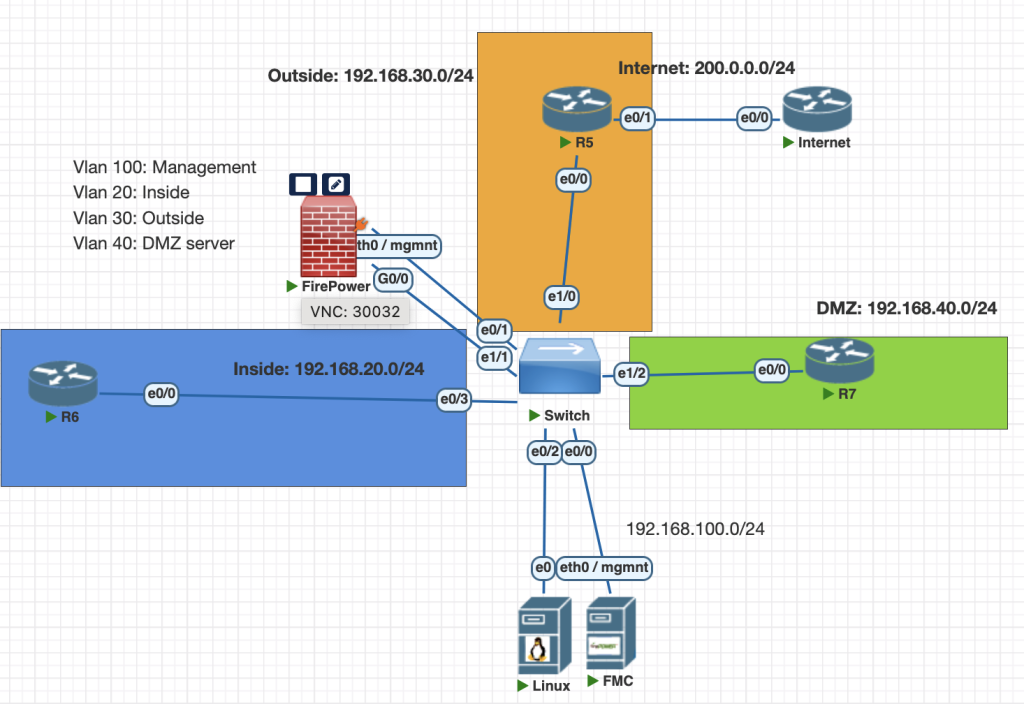
Topology
Testing Scenarios
Configure URL Filtering to control web traffic across Firewpower.
Create a simple policy to inspect traffic as follows:
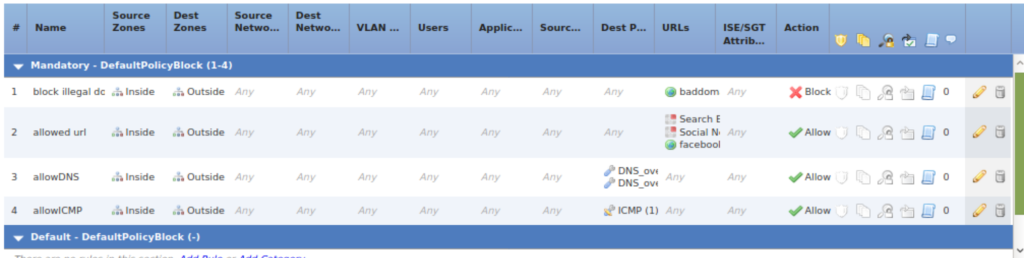
1. Permit access to “Social Networking” &“Search Engine and Portals” websites from categries, testing tdomain with facebook.com
2. Block access to a custom URL baddomain.com.
Configurations
below is full ACP configuration from cisco firepower, the rule is to allow dns and block some url.
Verifications
we can test our rule is correct with this command from R6 via command line.
first configure static host record from Internet router and enable dns for that router.
# Internet Router
conf t
ip host baddomain.com 200.0.0.2
ip host facebook.com 200.0.0.2
ip name-server 200.0.0.2
ip http server
ip dns server
Check our url filtering is correct from R6
#R6
# accessing facebook.com should be allowed
copy http://facebook.com/myfile.exe null:

# accessing baddomain.com should be blocked
copy http://baddomain.com/myfile.exe null:



Conclusions
- With url filtering we can filter URL for each users.
- make sure to active your license and update the url database.
- for HTTPS traffic make sure you choose application https traffic first.
If you found this useful, subscribe to newsletter