Overview
You can read the overview dual Hub DMVPN in this post. LINK
Topology
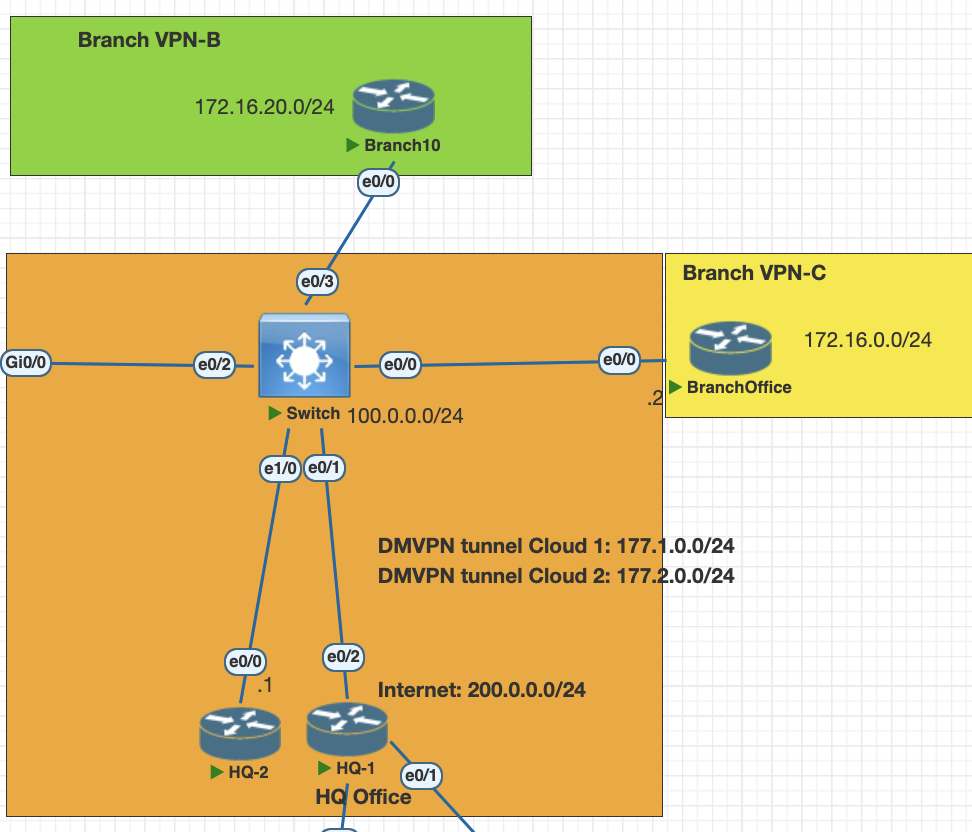
Testing Scenarios
- configure HQ 1 and HQ 2 as dual hub DMVPN phase 3
- Configure Branch B and C as spoke for dual hub
- enable BGP as a overlay.
- connec the Spoke as dynamic neighbor in BGP.
- enable IPsec on the tunnel ikev2.
Configurations
HQ 1
interface Tunnel0
 ip address 177.1.0.1 255.255.255.0
 no ip redirects
 ip mtu 1400
 ip nhrp authentication mydmvpn
 ip nhrp network-id 10
 ip nhrp redirect
 ip tcp adjust-mss 1360
 tunnel source Ethernet0/2
 tunnel mode gre multipoint
 tunnel key 100
HQ 2
interface Tunnel0
 ip address 177.2.0.1 255.255.255.0
 no ip redirects
 ip mtu 1400
 ip nhrp authentication mydmvpn
 ip nhrp network-id 20
 ip nhrp redirect
 ip tcp adjust-mss 1360
 tunnel source Ethernet0/0
 tunnel mode gre multipoint
 tunnel key 200
Spoke 1
interface Tunnel10
 ip address 177.1.0.2 255.255.255.0
 no ip redirects
 ip mtu 1400
 ip nhrp authentication mydmvpn
 ip nhrp map 177.1.0.1 100.0.0.1
 ip nhrp map multicast 100.0.0.1
 ip nhrp network-id 10
 ip nhrp nhs 177.1.0.1
 ip tcp adjust-mss 1360
 tunnel source Ethernet0/0
 tunnel mode gre multipoint
 tunnel key 100
end


interface Tunnel20
 ip address 177.2.0.2 255.255.255.0
 no ip redirects
 ip mtu 1400
 ip nhrp authentication mydmvpn
 ip nhrp map 177.2.0.1 100.0.0.4
 ip nhrp map multicast 100.0.0.4
 ip nhrp network-id 20
 ip nhrp nhs 177.2.0.1
 ip tcp adjust-mss 1360
 tunnel source Ethernet0/0
 tunnel mode gre multipoint
 tunnel key 200
end
Spoke 2
interface Tunnel10
 ip address 177.1.0.3 255.255.255.0
 no ip redirects
 ip mtu 1400
 ip nhrp authentication mydmvpn
 ip nhrp map 177.1.0.1 100.0.0.1
 ip nhrp map multicast 100.0.0.1
 ip nhrp network-id 10
 ip nhrp nhs 177.1.0.1
 ip tcp adjust-mss 1360
 tunnel source Ethernet0/0
 tunnel mode gre multipoint
 tunnel key 100


interface Tunnel20
 ip address 177.2.0.3 255.255.255.0
 no ip redirects
 ip mtu 1400
 ip nhrp authentication mydmvpn
 ip nhrp map 177.2.0.1 100.0.0.4
 ip nhrp map multicast 100.0.0.4
 ip nhrp network-id 20
 ip nhrp nhs 177.2.0.1
 ip tcp adjust-mss 1360
 tunnel source Ethernet0/0
 tunnel mode gre multipoint
 tunnel key 200
end
After this all the dmvpn connection is established, we can check with this configurations
show dmvpn
show nhrp
Configuration the routing BGP
HQ 1
# create prefix list and attach to route map to allow only vpn network
ip prefix-list VPN-Network seq 5 permit 172.16.0.0/16 le 24
ip prefix-list VPN-Network seq 10 permit 100.0.0.0/24
ip prefix-list VPN-Prefix seq 5 permit 172.16.0.0/16 le 24

route-map VPN-OUT permit 10
 match ip address prefix-list VPN-Network

router bgp 6500
 bgp log-neighbor-changes
 bgp listen range 177.0.0.0/8 peer-group SPOKES
 neighbor SPOKES peer-group
 neighbor SPOKES remote-as 6500
 neighbor SPOKES update-source Tunnel0
 neighbor SPOKES route-reflector-client
 neighbor SPOKES next-hop-self all
 neighbor SPOKES soft-reconfiguration inbound
 neighbor SPOKES route-map VPN-OUT out
HQ 2
# create prefix list and attach to route map to allow only vpn network
ip prefix-list VPN-Network seq 5 permit 172.16.0.0/16 le 24
ip prefix-list VPN-Network seq 10 permit 100.0.0.0/24
ip prefix-list VPN-Prefix seq 5 permit 172.16.0.0/16 le 24

route-map VPN-OUT permit 10
 match ip address prefix-list VPN-Network

router bgp 6500
 bgp log-neighbor-changes
 bgp listen range 177.0.0.0/8 peer-group SPOKES
 neighbor SPOKES peer-group
 neighbor SPOKES remote-as 6500
 neighbor SPOKES update-source Tunnel0
 neighbor SPOKES route-reflector-client
 neighbor SPOKES next-hop-self all
 neighbor SPOKES soft-reconfiguration inbound
 neighbor SPOKES route-map VPN-OUT out
Spokes BGP configurations
# create prefix list and attach to route map to allow only vpn network
ip prefix-list VPN-Network seq 5 permit 172.16.0.0/16 le 24
ip prefix-list VPN-Network seq 10 permit 100.0.0.0/24
ip prefix-list VPN-Prefix seq 5 permit 172.16.0.0/16 le 24

route-map VPN-OUT permit 10
 match ip address prefix-list VPN-Network

router bgp 6500
 bgp log-neighbor-changes
 redistribute connected
 neighbor 177.1.0.1 remote-as 6500
 neighbor 177.1.0.1 soft-reconfiguration inbound
 neighbor 177.1.0.1 route-map VPN-OUT out
 neighbor 177.2.0.1 remote-as 6500
 neighbor 177.2.0.1 soft-reconfiguration inbound
 neighbor 177.2.0.1 route-map VPN-OUT out
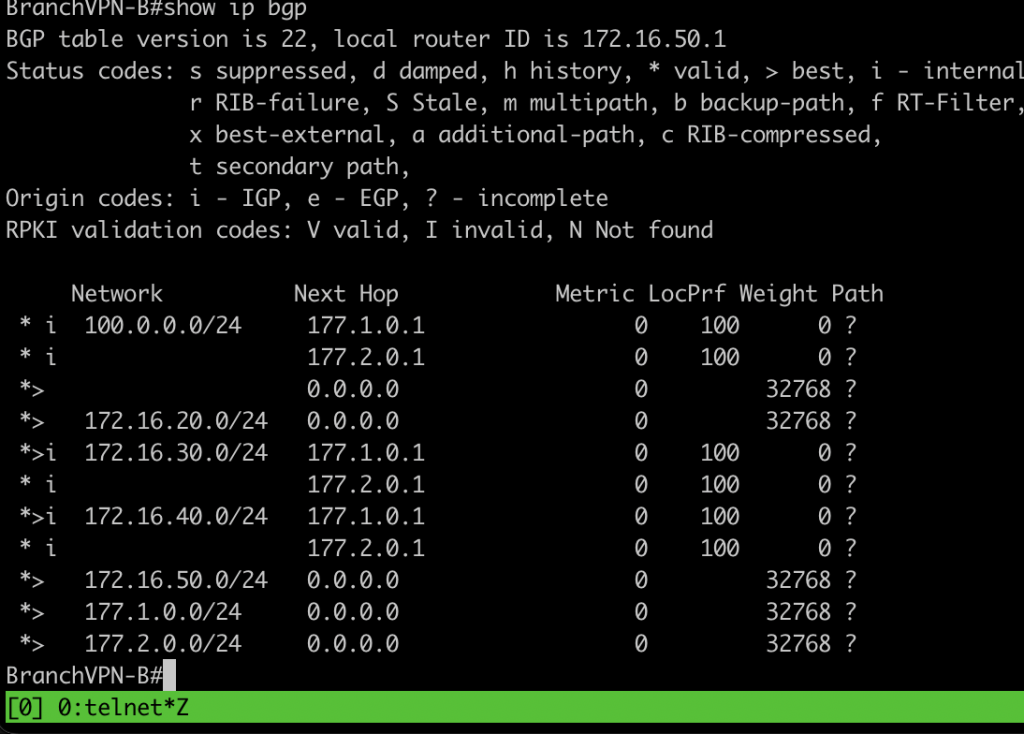
Verification BGP
show ip bgp sum # check bgp neighbor
show ip bgp # check routing table bgp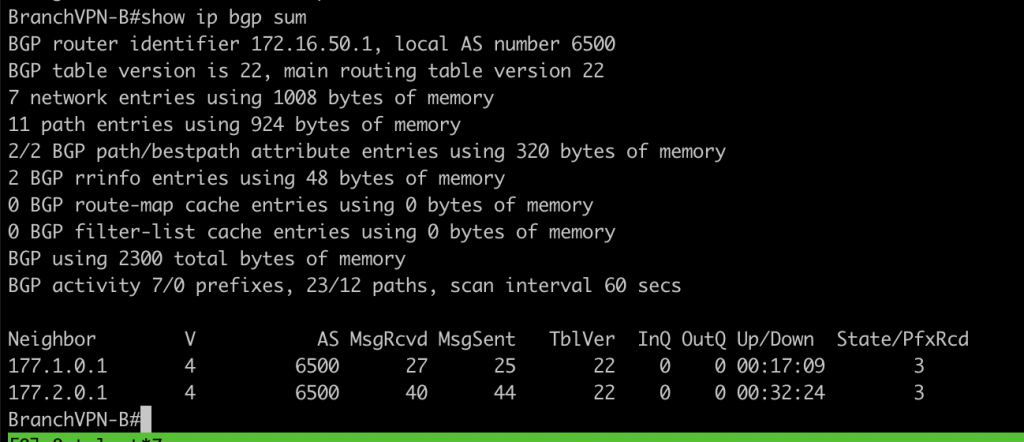
Configuration for IKEv2
# create IKEv2 proposal and policy
crypto ikev2 proposal PROF-DMVPN
 encryption aes-cbc-128
 integrity sha256
 group 15
crypto ikev2 policy POLICY-DMVPN
 proposal PROF-DMVPN
crypto ikev2 keyring DMVPN-PEER
 peer DMVPN
  address 100.0.0.0 255.255.255.0
  pre-shared-key dmvpnnetwork
 !
crypto ikev2 profile DMVPN
 ! Profile incomplete (no match identity or match certificate statement)
 authentication remote pre-share
 authentication local pre-share
crypto ikev2 profile DMVPN-IKEV2-PROFILE
 match identity remote address 100.0.0.0 255.255.255.0
 identity local address 100.0.0.1 ## change the ip address with local ip
 authentication remote pre-share
 authentication local pre-share
 keyring local DMVPN-PEER

# ipsec profile
crypto ipsec transform-set SET1 esp-3des esp-sha-hmac
 mode tunnel
crypto ipsec transform-set SET2 esp-aes 256 esp-sha-hmac
 mode tunnel
crypto ipsec profile PROFDMVPN
 set transform-set SET1
 set ikev2-profile DMVPN-IKEV2-PROFILE
apply the configuration into each tunnel interface
# hubs device
int tun 0
 tunnel protection ipsec profile PROFDMVPN

# spokes device
int tun 10
 tunnel protection ipsec profile PROFDMVPN shared
int tun 20
 tunnel protection ipsec profile PROFDMVPN shared
after that please verfify the ikev2, ipsec and bgp is up
show crypto ikev2 sa
show crypto ipsec sa
show ip bgp sum
Troubleshooting IKEv2, IPSec
- please make sure all the attribute is match between peer.
- make sure identity peer of IKEv2 is match with the ip address
- if all those attibutitues is match trigger the negotiation again with shutdown and no sh interface
- for detail troubleshooting use debug command
debug crypto ipsec
debug crypto ikev2