Overview
Authentications
- OSPFv2 support 3 types authentication:
- Type 0 (null)
- Type 1 (clear text)
- Type 2 (hased)
- MD5, SHA1, and SHA2
- OSPFv3 authentication is provided by IPsec. Can provide AH (authentication) and ESP (encryption).
Prefix limit
- protect local resource system against OSPF misscofig
- set threshold for max number of allowed redistribute route
- Configure with redistribute max-prefix
- the behavior is warning-only
Topology
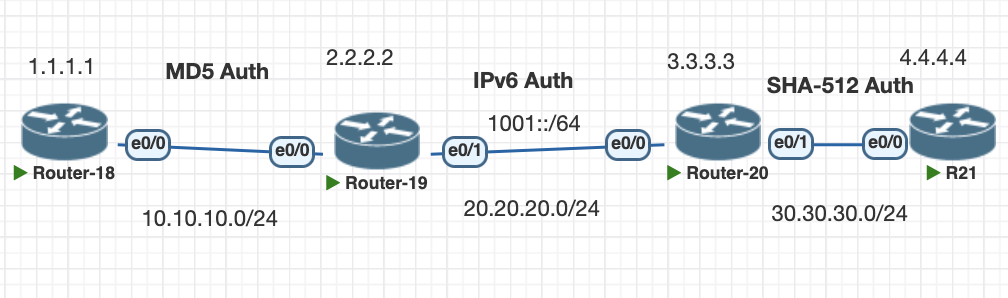
Testing Scenario
- Configure OSPF between R18 and R19 using MD5 authentications
- Configure OSPFv3 between R19 and R20 using IPsec
- Configure OSPF authentication SHA-512 Between R20 and R21
- Configure prefix limit on Router 18 to 2 prefix only.
Configurations
1. Configuring OSPF R18 and R19 using MD5 authentications
#R18 enable using area 0 mode and configure the key on the interface
router ospf 1
 area 0 authentication message-digest
 network 1.1.1.1 0.0.0.0 area 0
 network 10.10.10.0 0.0.0.255 area 0

interface Ethernet0/0
 ip address 10.10.10.1 255.255.255.0
 ip ospf authentication message-digest
 ip ospf message-digest-key 1 md5 mycisco

#R19 enable on interface
interface Ethernet0/0
 ip address 10.10.10.2 255.255.255.0
 ip ospf authentication message-digest
 ip ospf message-digest-key 1 md5 mycisco
 ip ospf 1 area 0
verifications
show ip ospf interface ethernet 0/0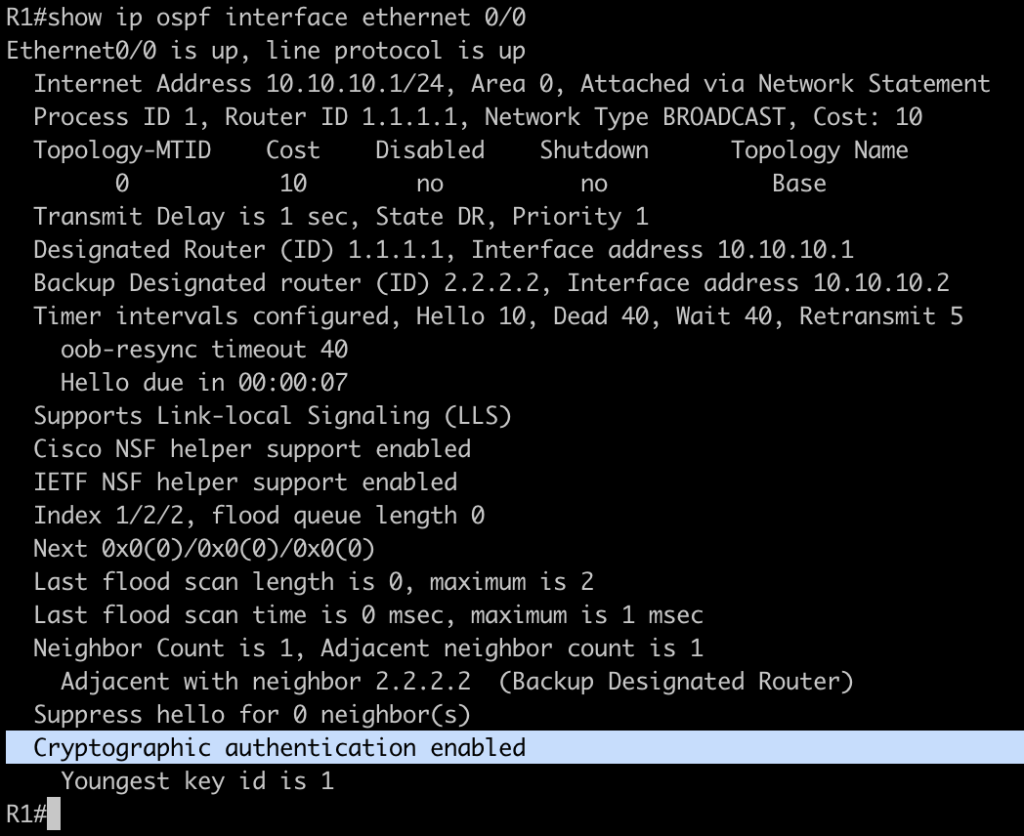
2. Configure OSPFv3 between R19 and R20 using IPsec
# R21
ipv6 router ospf 1
 router-id 2.2.2.2
interface Ethernet0/1
 ip address 20.20.20.1 255.255.255.0
 ipv6 address 1001::1/64
 ipv6 ospf authentication ipsec spi 300 sha1 1234567890123456789012345678901234567890
 ipv6 ospf 1 area 0
end

# R20
ipv6 router ospf 1
 router-id 3.3.3.3

interface Ethernet0/0
 ip address 20.20.20.2 255.255.255.0
 ipv6 address 1001::2/64
 ipv6 ospf authentication ipsec spi 300 sha1 1234567890123456789012345678901234567890
 ipv6 ospf 1 area 0
end
verification, we can check the ipv6 interface ospf and ipsec tunnel for each router
show ipv6 ospf interface eth 0/1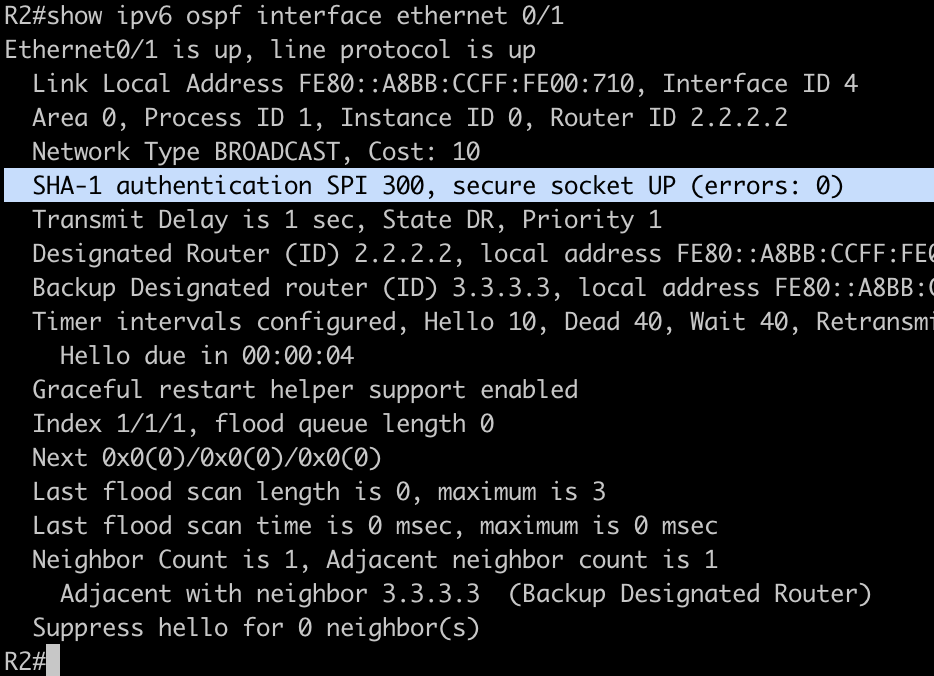
show crypto session detail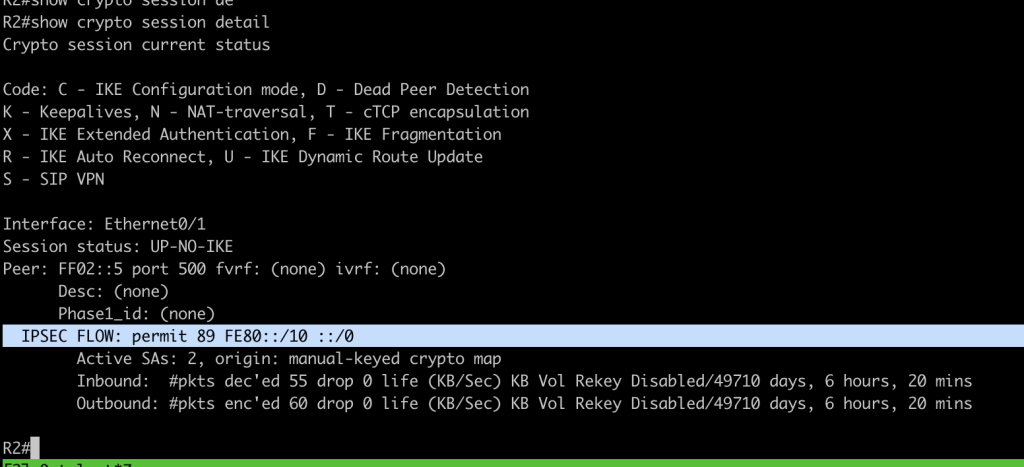
3. Configure OSPF authentication using SHA R20 and R21
Configuration start with creating key chain and attach to the interface
# configure key chain on both of the router.
key chain ospf
 key 1
  key-string myospfpassword
  cryptographic-algorithm hmac-sha-512

interface Ethernet0/1
 ip address 30.30.30.1 255.255.255.0
 ip ospf authentication key-chain ospf
 ip ospf 1 area 0
 duplex auto
verification interface ospf using SHA authentication password
show ip ospf inter eth 0/1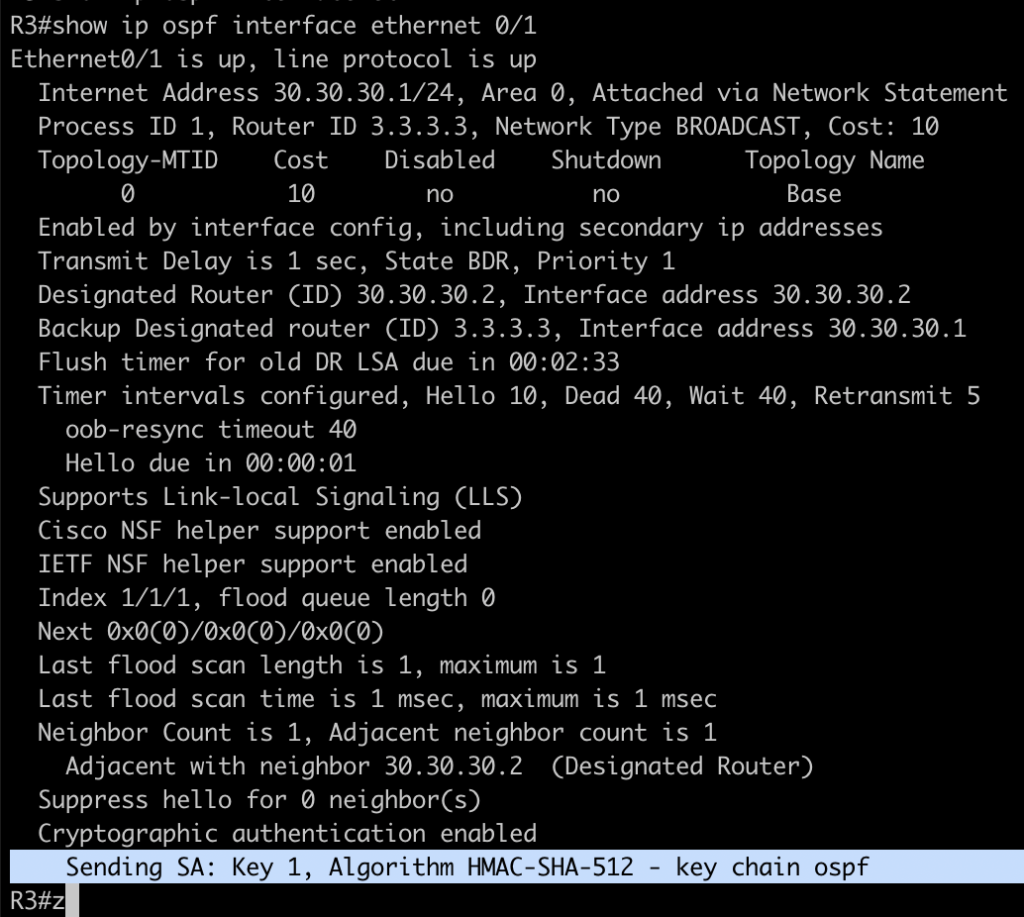
4. Configure prefix limit on R18 only accept 2 prefixs
configuration to limit prefix in OSPF, in this example the route is from connected interface redistribute
router ospf 1
 area 0 authentication message-digest
 redistribute maximum-prefix 2
 redistribute connected subnets
 network 1.1.1.1 0.0.0.0 area 0
 network 10.10.10.0 0.0.0.255 area 0
when prefix reach the limit we can see this log from console

the route will not advertise to neighbor but still stora in LSDB OSPF
Conclusions
- OSPF provide multple option to provide authentication to neighbor from MD5, null and SHA.
- OSPF also can provide authentication and encryption for IPv6 traffic with Ipsec for security features.
- OSPF can prevent prefix leak by limiting the prefix limit in ospf process
If you found this useful, subscribe to newsletter
