Overview
- Using dual hub provide redundancy
- the spokes are required to each hub
- there are 2 design for dual Hub
1. Single cloud
- using one mGRE tunnel on the spokes and hubs
- Hubs are in the Same Network between Hub
- Spoke need to configure with NHRP mapping for each hubs
- Offer little routing control, difficult to traffic engineering.
- IGP workaround
- AD changes
- EIGRP offset lists
- IGP workaround
- Good for active/standby deployments
2. Dual Cloud
- using multiple mGRE on spokes and one in hub
- Hubs are in different subnet
- each spoke is corresponds to each hub
- Traffic engineering can be performed with normal IGP Technique
- delay, cost , etc.
- IPsec protection may need to shared on the spokes
- # need to enable tunnel protection ipsec profile shared
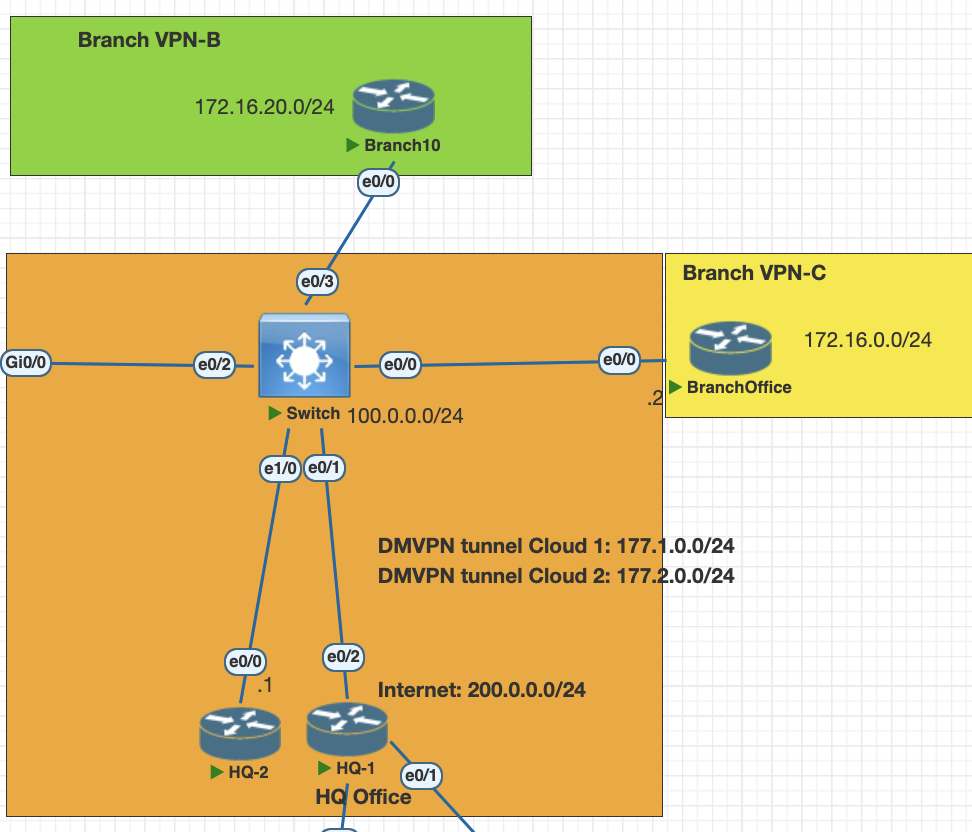
Topology
Testing scenarios
- configure HQ 1 and HQ 2 as dual hub DMVPN phase 3
- Configure Branch B and C as spoke for dual hub
- enabble EIGRP as a overlay IGRP
- enable IPsec on the tunnel ikev1 with crypto map
Configuration
HQ 1 DMVPN tunnel phase 3
interface Tunnel0
 ip address 177.1.0.1 255.255.255.0
 no ip redirects
 ip mtu 1400
 no ip split-horizon eigrp 1
 ip nhrp authentication mydmvpn
 ip nhrp network-id 10
 ip nhrp redirect # for phase 3
 ip tcp adjust-mss 1360
 tunnel source Ethernet0/2
 tunnel mode gre multipoint
 tunnel key 100
HQ 2 HQ 1 DMVPN tunnel phase 3
interface Tunnel0
 ip address 177.2.0.1 255.255.255.0
 no ip redirects
 ip mtu 1400
 no ip split-horizon eigrp 1
 ip nhrp authentication mydmvpn
 ip nhrp network-id 20
 ip nhrp redirect # for phase 3
 ip tcp adjust-mss 1360
 tunnel source Ethernet0/0
 tunnel mode gre multipoint
 tunnel key 200
Branch-B spoke
interface Tunnel10
 ip address 177.1.0.2 255.255.255.0
 no ip redirects
 ip mtu 1400
 ip nhrp authentication mydmvpn
 ip nhrp map 177.1.0.1 100.0.0.1
 ip nhrp map multicast 100.0.0.1
 ip nhrp network-id 10
 ip nhrp nhs 177.1.0.1
 ip tcp adjust-mss 1360
 tunnel source Ethernet0/0
 tunnel mode gre multipoint
 tunnel key 100

interface Tunnel20
 ip address 177.2.0.2 255.255.255.0
 no ip redirects
 ip mtu 1400
 ip nhrp authentication mydmvpn
 ip nhrp map 177.2.0.1 100.0.0.4
 ip nhrp map multicast 100.0.0.4
 ip nhrp network-id 20
 ip nhrp nhs 177.2.0.1
 ip tcp adjust-mss 1360
 tunnel source Ethernet0/0
 tunnel mode gre multipoint
 tunnel key 200
Branch-C spoke
interface Tunnel10
 ip address 177.1.0.3 255.255.255.0
 no ip redirects
 ip mtu 1400
 ip nhrp authentication mydmvpn
 ip nhrp map 177.1.0.1 100.0.0.1
 ip nhrp map multicast 100.0.0.1
 ip nhrp network-id 10
 ip nhrp nhs 177.1.0.1
 ip tcp adjust-mss 1360
 tunnel source Ethernet0/0
 tunnel mode gre multipoint
 tunnel key 100

interface Tunnel20
 ip address 177.2.0.3 255.255.255.0
 no ip redirects
 ip mtu 1400
 ip nhrp authentication mydmvpn
 ip nhrp map 177.2.0.1 100.0.0.4
 ip nhrp map multicast 100.0.0.4
 ip nhrp network-id 20
 ip nhrp nhs 177.2.0.1
 ip tcp adjust-mss 1360
 tunnel source Ethernet0/0
 tunnel mode gre multipoint
 tunnel key 200
Verification for DMVP dual hub
on hub devices check with command and make sure the router is connected to both spoke
show dmvpn
show nhrp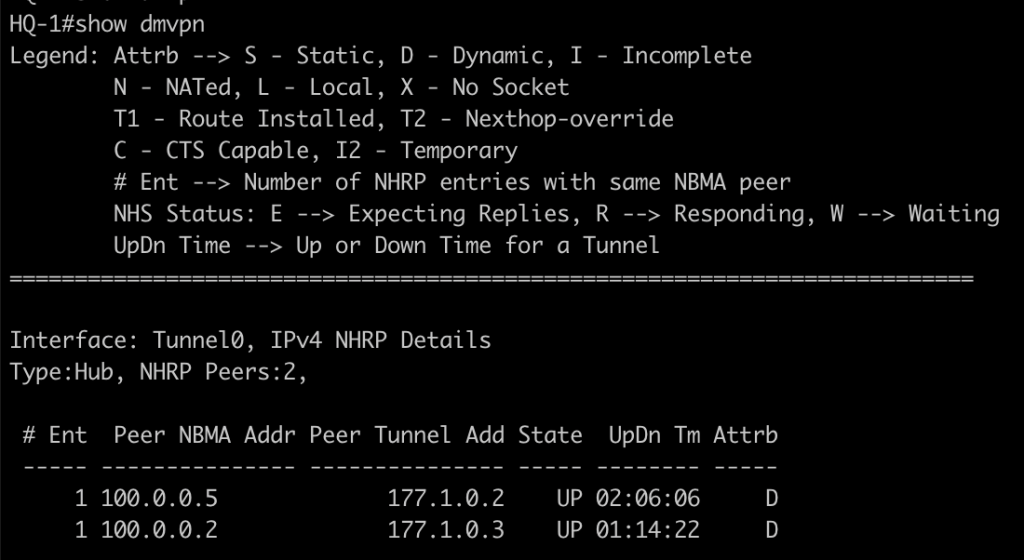
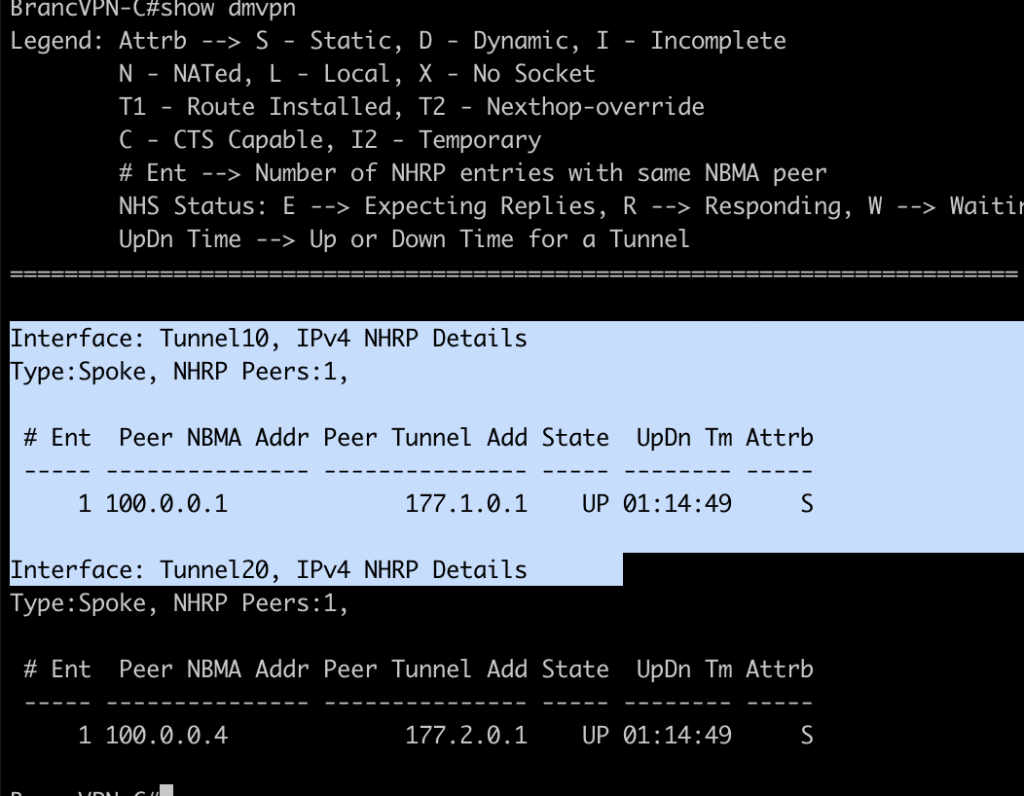
on spoke router we could see each gre tunnel is connected to hub devices.
Configuring EIGRP as IGP in Hub and Spoke devices
HQ-1 and HQ-2
router eigrp 1
 network 172.16.0.0
 network 177.0.0.0 0.255.255.255
 no auto-sum
Branch B and C
router eigrp 1
 network 172.16.0.0
 network 177.0.0.0 0.255.255.255
 no auto-sum
Verification routing table
in phase 3 all the next hop is pointing to the hub, however when we ping or traceroute in CEF/RIB it will change to spoke ip address
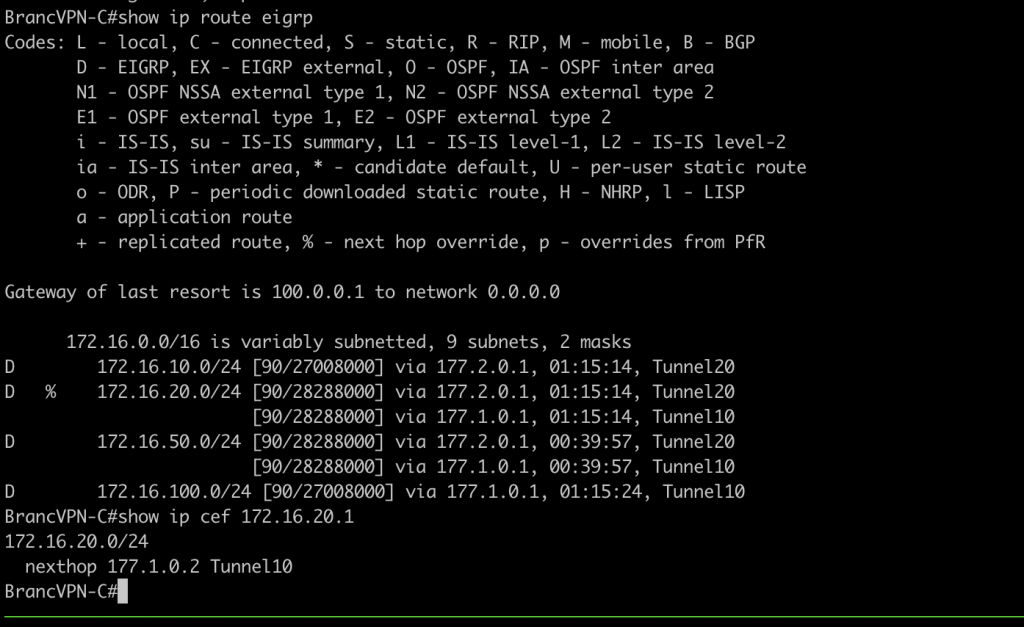
if you want to redirect traffic instead of load balancing we can adjust parameter of EIGRP for example delay value
# spoke
int tun 0
  delay 20000
Configuring IPsec on DMVPN
first create crypto map profile for each hub and spoke and attach the ipsec profile in tunnel interface.
crypto isakmp policy 10
 authentication pre-share
crypto isakmp key mydmvpn address 0.0.0.0
crypto ipsec transform-set SET1 esp-3des esp-sha-hmac
 mode transport
crypto ipsec profile PROFDMVPN
 set transform-set SET1

# configure to interface tunnel
interface Tunnel10
 tunnel protection ipsec profile PROFDMVPN shared
Verification IPsec
show crypto ipsec sa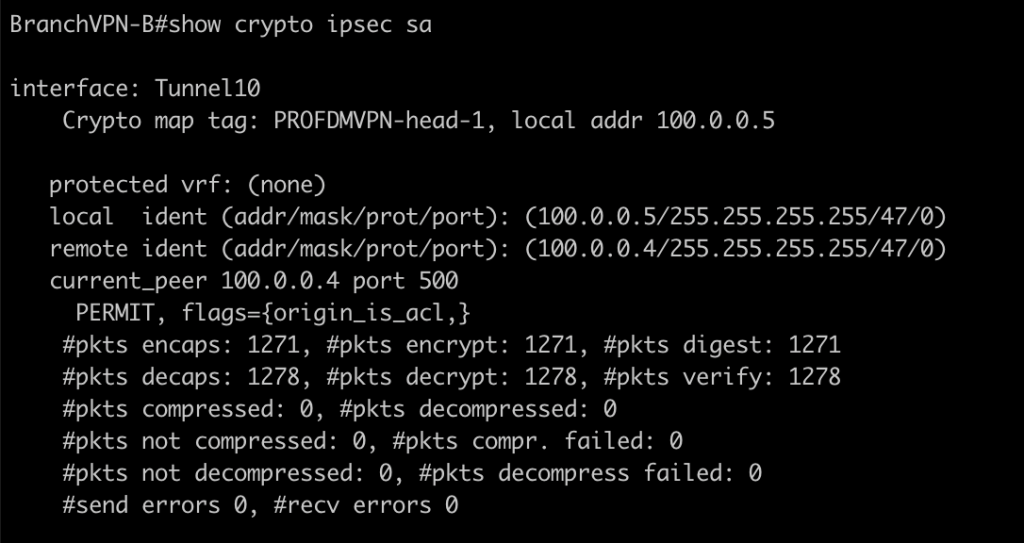
Conclusions
- we can use dual hub for redundancy in DMVPN.
- Best practice for designing Dual Hub is using dual cloud, each spoke need to connect to each mGRE.
- we can secure the VPN connection with IPsec however in dual hub topologi the profile must be share because using same source interface physical for the tunnel.
If you found this useful, subscribe to newsletter