Overview Redundancy GETVPN
- Usually call Cooperative KS (COOPS KS)
- Redundant GETVPN uses two key servers: Primary and secondary
- connected with a persistent GDOI Tunnel
- Primary KS
- elected based higher priority
- responsible for rekeyring
- Registration can be load balanced
- Manual GM configuration
- Routing using anycast
- SLB: behind virtual IP or load balancer.
Coops Configurations
- All key servers
- use same asymetric keys pair
- crypto key generate rsa label exportable
- crypto key [ export | import ] rsa
- enable periodic keepalive/DPD
- crypto isakmp keepalive periodic
- Configure COOPS KS settings
- local priority
- peer address
- use same asymetric keys pair
- The policy & other settings like profile crypto, ipsec profle and access list should manually sync between ks.
Overview GETVPN for IPv6
- GETVPN supports IPv6 in the Data Plane
- control plane require IPv4
- GM must be dual-stack and have the right IOS code (show crypto feature ipv6-crypto-path)
- Configuration
- Key server
crypto gdoi group ipv6 & match ipv6 access list- Group Member
crypto gdoi group ipv6 & crypto map ipv6 & ipv6 crypto mapOverview GETVPN G-IKEv2
- Adds IKEv2 support in the GETVPN control plane
- easy migration
- still run on UDP 848
- GDOI and G-IKEv2 can be configured in the same group
- easy migration
- Restrictions
- COOP KS tunnel needs IKEv1
- IPv6 support (Data Plane)
Configurations
- All devices
- IKEv2 proposal, policy, credential store & profile
- Key server
- Define Group (crypto gkm group)
- attach IKEv2 Profile (gikev2)
- Group Member
- define group (crypto gkm group)
- attach IKEv2 profile (client protocol gikev2)
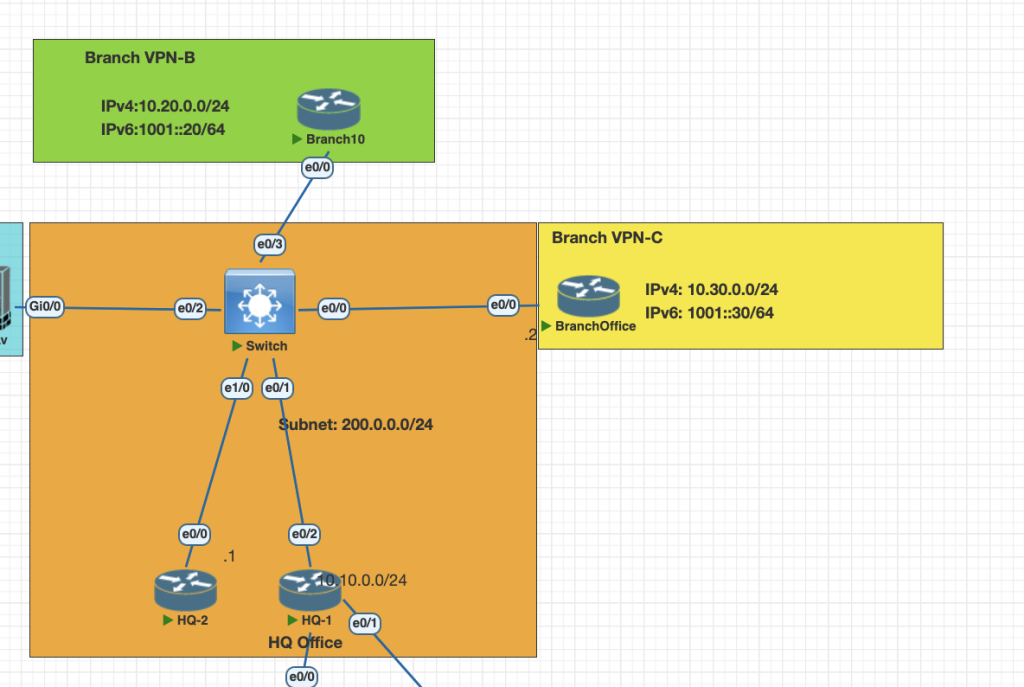
Topology
Testing Scenarios
- Configure HQ-1 (Primary) and HQ-2 (Secondary) as a redundant KS for all GM in the networks.
- Make sure connection ipv6 traffic from each Branch is encrypted.
- Configure the network GETVPN use IKEv2.
Configurations
Basically if we want to procedural config this scenario use this step.
KS: HQ-1 and HQ-2
- on HQ-1 Preparing all the requirement config, so we can paste to HQ-2
# HQ-1
# generete rsa key exportable
crypto key generate rsa exportable label MYVPN modulus 2048

# export key rsa to be imported to HQ2
crypto key export rsa MYVPN pem terminal des cisco123

crypto isakmp policy 10
 authentication pre-share
crypto isakmp key cisco123 address 200.0.0.0       255.255.255.0

ipv6 access-list VPN6
 permit ipv6 1001::/16 1001::/16

crypto ikev2 profile IKEPROF
 match identity remote any
 authentication remote pre-share key cisco.com
 authentication local pre-share key cisco.com

crypto ipsec transform-set SET1 esp-aes esp-sha-hmac
 mode tunnel
crypto ipsec profile IPSECPROF
 set transform-set SET1
 set ikev2-profile IKEPROF
2. Import RSA to HQ-2 and sync all the requirement config such as acl, ipsec profile, crypto isakmp for gdoi coop cs
# Import rsa from HQ-1 with this command
crypto key import rsa MYVPN terminal cisco123

# copy the isakmp, acl ipv6, ikev2, ipsec profile from HQ-1 to HQ-2
3. HQ-1 configuring GKM G-IKEv2
crypto gkm group ipv6 GET6
 identity number 200
 server local
  gikev2 IKEPROF
  rekey authentication mypubkey rsa MYVPN
  rekey transport unicast
  sa ipsec 1
   profile IPSECPROF
   match address ipv6 VPN6
   replay counter window-size 64
   no tag
  address ipv4 200.0.0.1
  redundancy
   local priority 200
   peer address ipv4 200.0.0.4
4. HQ-2 configuring GKM G-IKEv2
crypto gkm group ipv6 GET6
 identity number 200
 server local
  gikev2 IKEPROF
  rekey authentication mypubkey rsa MYVPN
  rekey transport unicast
  sa ipsec 1
   profile IPSECPROF
   match address ipv6 VPN6
   replay counter window-size 64
   no tag
  address ipv4 200.0.0.4
  redundancy
   local priority 200
   peer address ipv4 200.0.0.1
GM: Branch-B and Branch-C
- Configure the crypto G-IKEv2 profile and map
# configure ikev2 profile
crypto ikev2 profile IKEPROF
 match identity remote any
 authentication remote pre-share key cisco.com
 authentication local pre-share key cisco.com

# configure GKM crypto
crypto gkm group ipv6 GET6
 identity number 200
 server address ipv4 200.0.0.1
 server address ipv4 200.0.0.4
 client protocol gikev2 IKEPROF

crypto map ipv6 MAP6 1 gdoi
 set group GET6
 ipv6 crypto map MAP6

# attach the mapper to interface
interface Ethernet0/0
 ipv6 crypto map MAP6
2. Make sure you configure the routing protocol for Ipv6 in this case im using EIGRP as IGP
ipv6 router eigrp 1
 eigrp router-id 10.30.0.1
interface Loopback0
 ip address 10.30.0.1 255.255.255.0
 ipv6 address 1001:30::1/64
 ipv6 eigrp 1
end
interface Ethernet0/0
 ip address 200.0.0.3 255.255.255.0
 ipv6 address 1001::3/64
 ipv6 eigrp 1
 ipv6 crypto map MAP6
end
Verifications
KS Coops HA
show crypto key mypubkey rsa # show all current generated rsa
show crypto gkm ks coop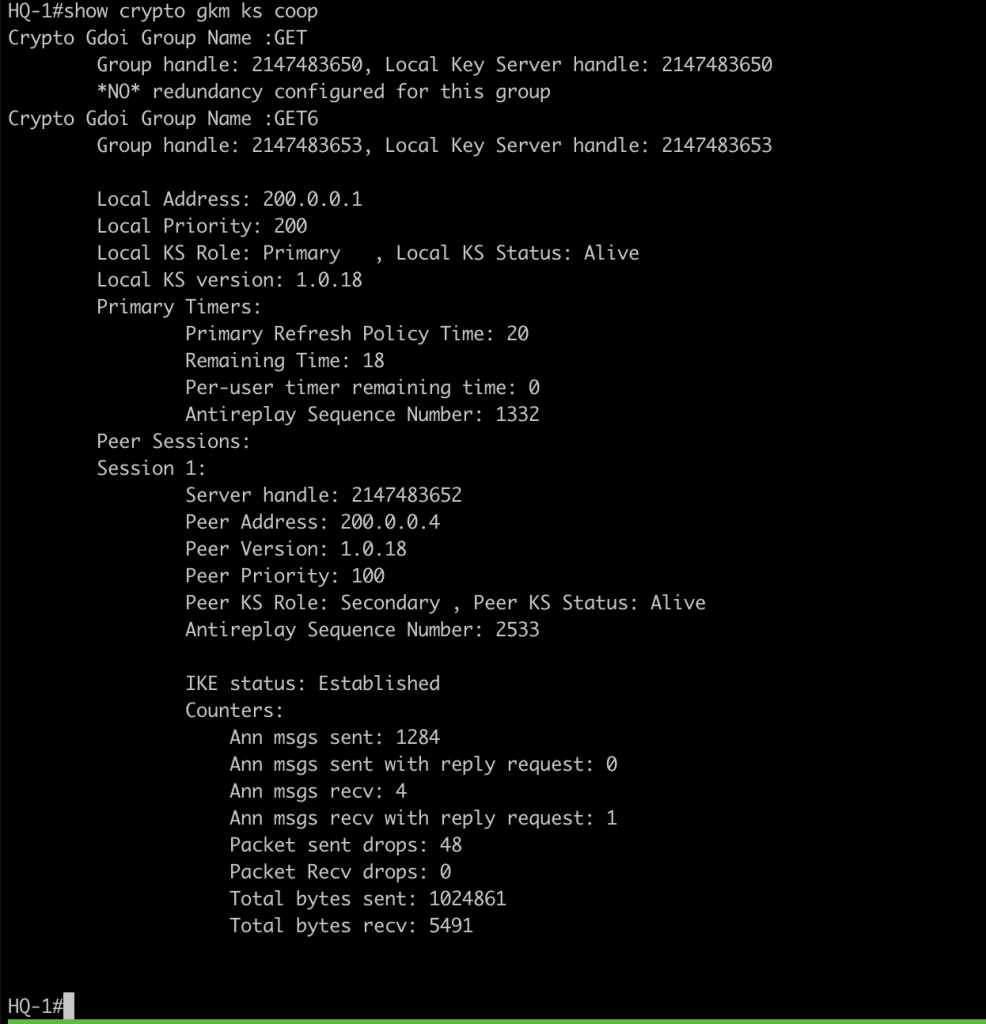
show crypto gkm ks 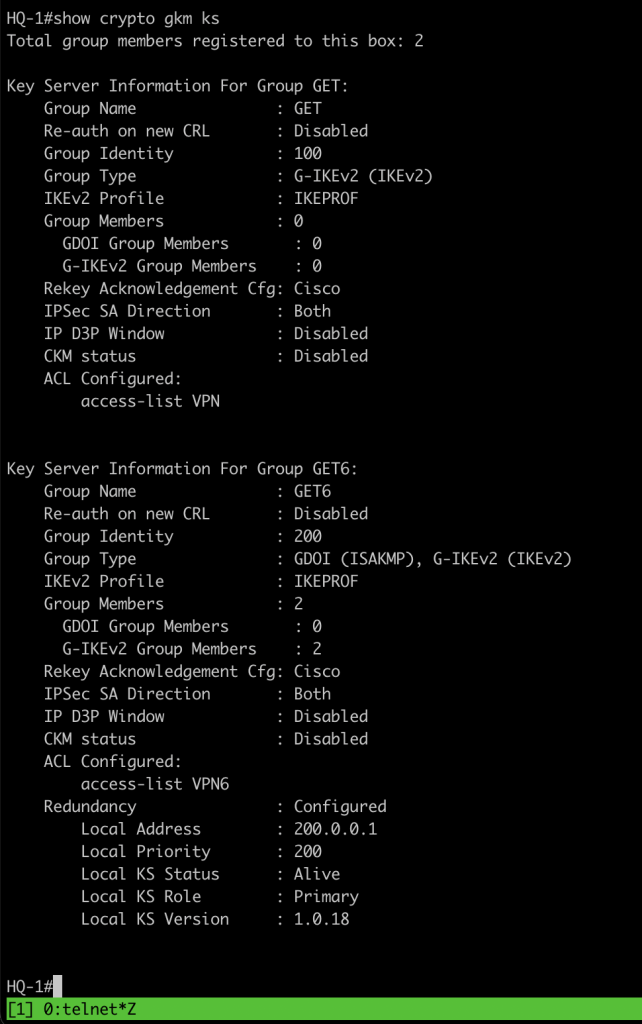
GM verification
show crypto gkm gm 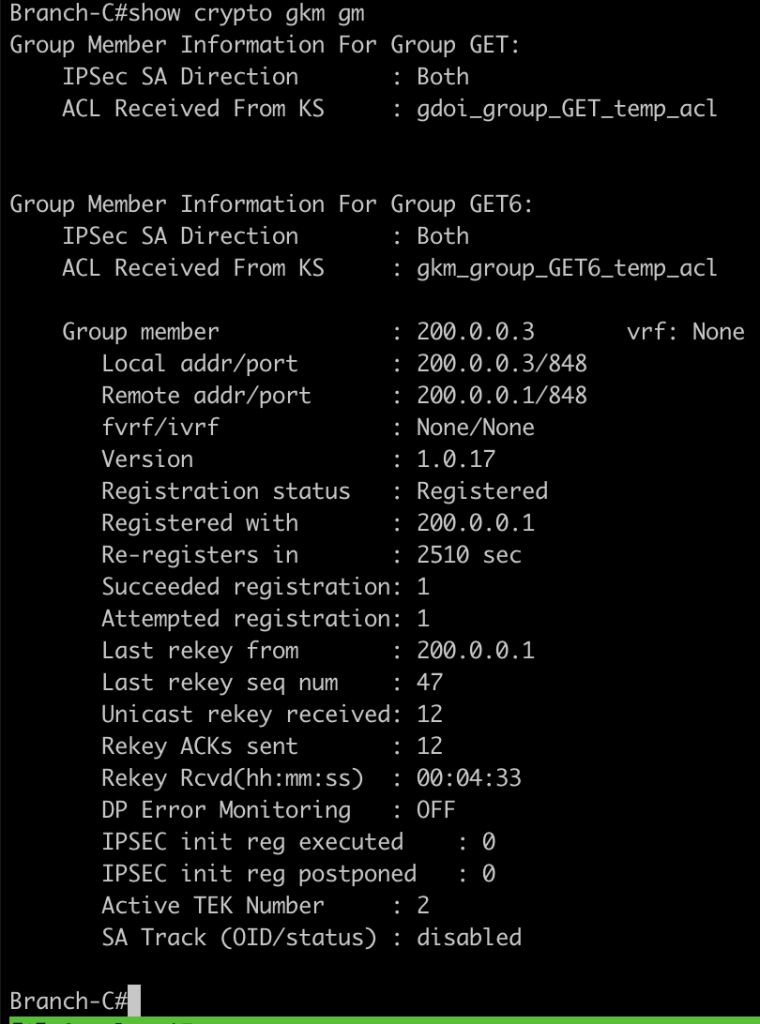
we can also check the communication ipv6 between branch is encrypted with ping command and check the encap/decap counters
ping 1001:20::1 source lo0 repeat 100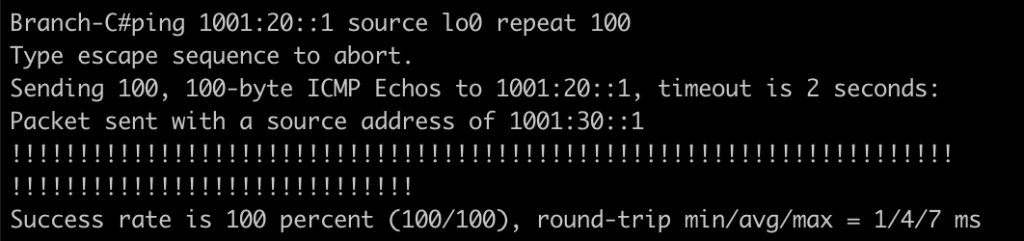
show crypto session detail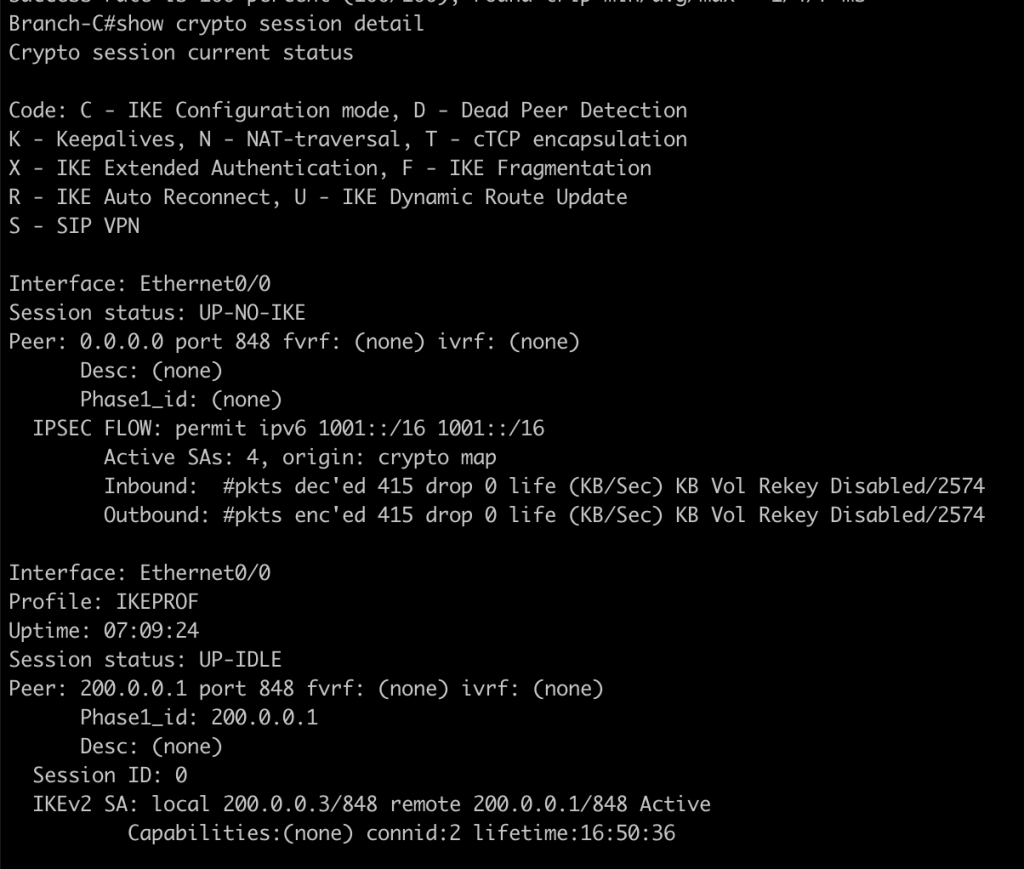
show crypto gkm gm dataplane counters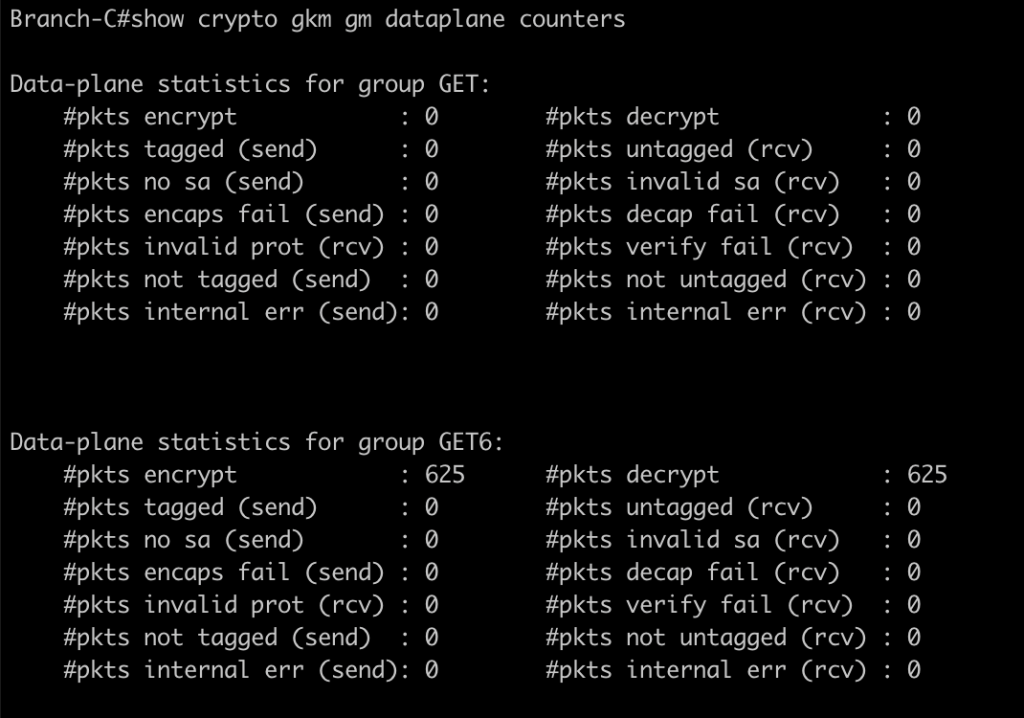
you can also try to disable or shutdown KS 1 to verify for redundant KS in the network
Conclusions
From this lab i learned a lot about GETVPN some of note during lab and troubleshootings is :
- Make sure to configure IKEv2 profile with password key and allow the network ip addres.
- Make sure during step configurtion coop ks GDOI is enabled.
- Make sure all the routing table ipv6 is already installed before testing the connection.
- in GM devices we dont have to define ACL, IPsec profile. all configurtion is downloaded during registration to KS
If you found this useful, subscribe to newsletter