
Overview Traditional Network
- use VLAN and ACL to create policy and enforcement in the network
- problem:
- not scalable and depend on the ip address/fixed location.
- when vlan is bigger its hard to configure acl and manage the vlan
- traffic enforcement at layer 3, the more (more source, and destination x permissions)ACE the more problems.
- problem:
- dynamic acl download from security devices such as cisco ISE
- ingress enforcement after device success authentication
- single source but possibility multi destination and actions.
- Problem:
- exhausted TCAM table when there are multiple users
- Not scalable and increase complexity.
Overview TrustSec
- Next generation to simplified access control
- control are based on roles/context rather than ip address.
- eg: security group , contractor, employee
- each security group assign a tag {label} for identification and filtering
- SGT (Security Group Tag)
- Filtering policy is defined based Security group ACL (SGACLs)
- source SGT, destination SGT, action and protocol
- example: employee (10)- > Server (20) : all ip log
- there are no ip address define in this scenario.
- the policy is scalable, “follow users” and does not depend on the network topology.
- DNAC (domain authentication) and MACsec is optional.
TrustSec Operations
- Classifications
- assignment of SGT to a session or resrouce
- usually performed ingress
- assignment of SGT to a session or resrouce
- Propagation
- distribution of IP-SGT mapping to enforcement points.
- Enforcement
- application of configured (downloaded) policies
- usually performed egress
- application of configured (downloaded) policies
Topology
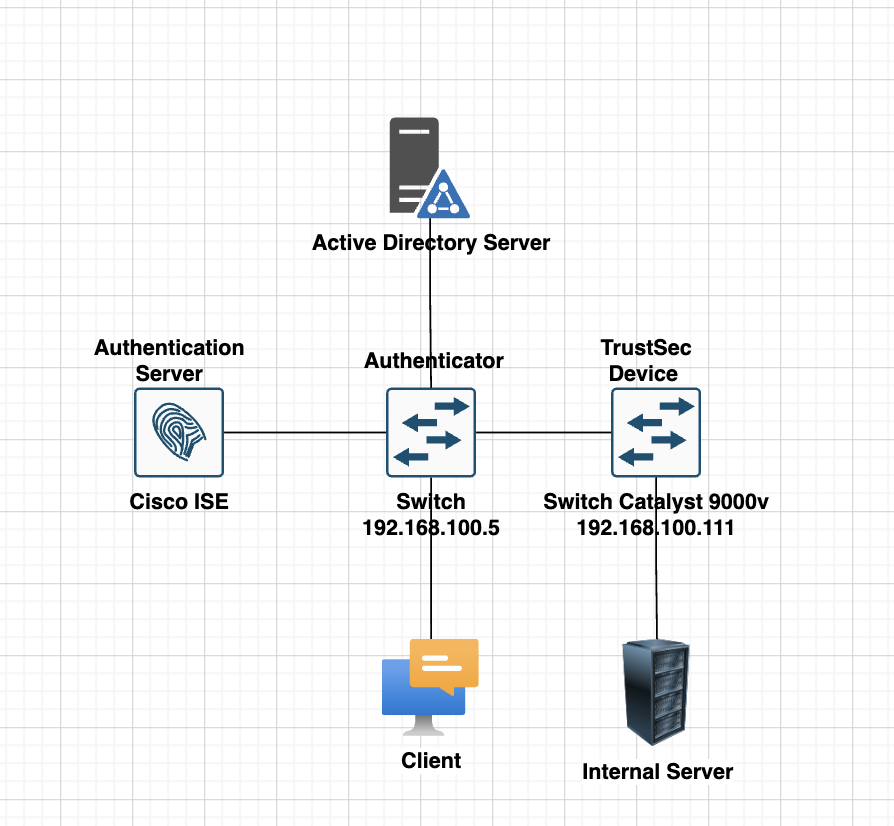
Network Devices for the Lab
- Cisco Catalyst 9000v (Trustsec supported)
- Cisco ISE 3.1
- Cisco IOL L2.
Scenario
- Configure TrustSec components on ISE1
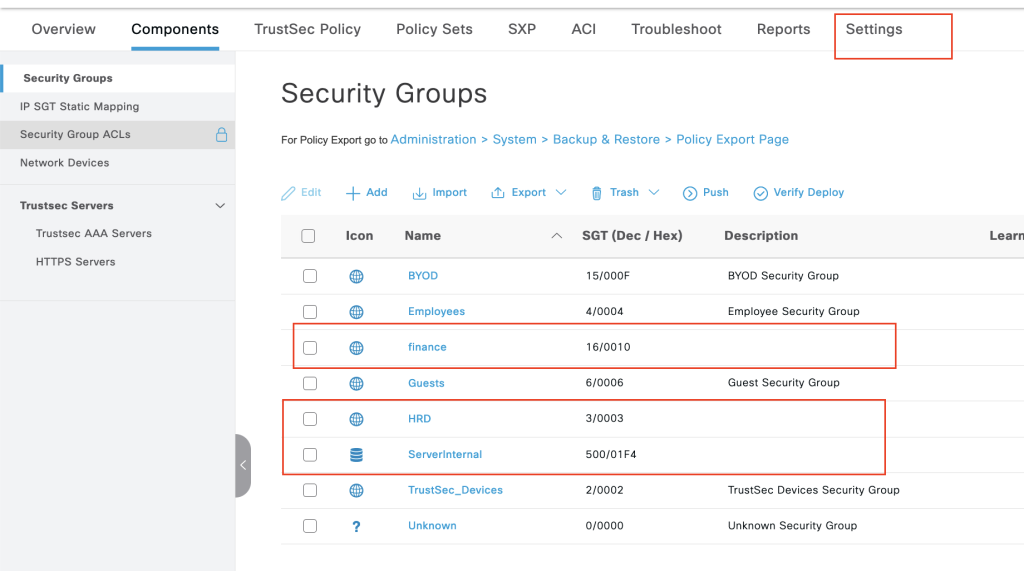
- Configure SGT for Finance (16) and HR (3)
- Integrate Catalyst 9k with ISE for TrustSec
- SW1 & ISE are preconfigured for basic communication
- Make sure SW1 downloads PAC & environment data from ISE
- Use a password cisco123 for PAC provisioning
- configure SGACL for department.
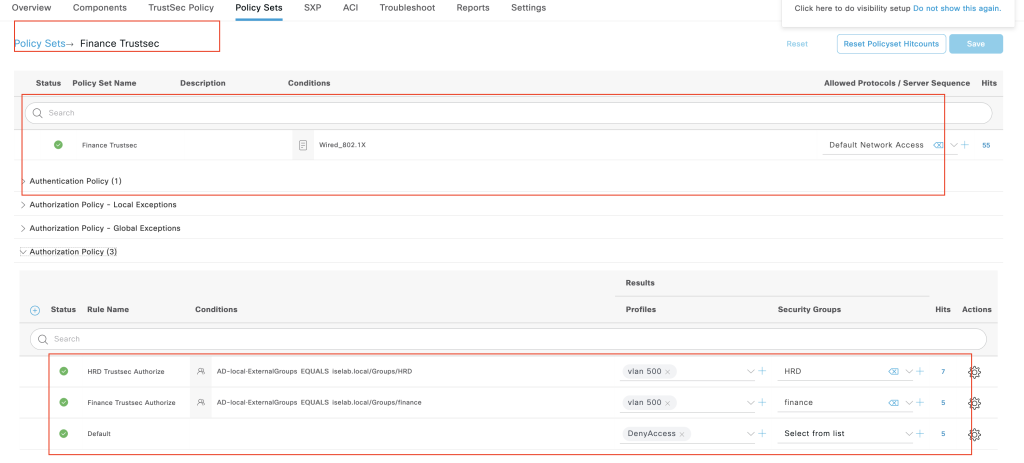
- both finance and HRD will be place in vlan 500 profile
- finance: allow icmp, http traffic, deny everything to server internal and log all the traffic to console.
- HRD: allow only port 23 to server internal and log the traffic to the console
- Verification all the task using Client PC.
Configurations
ISE configuration
- Add both of group finance and HRD from AD
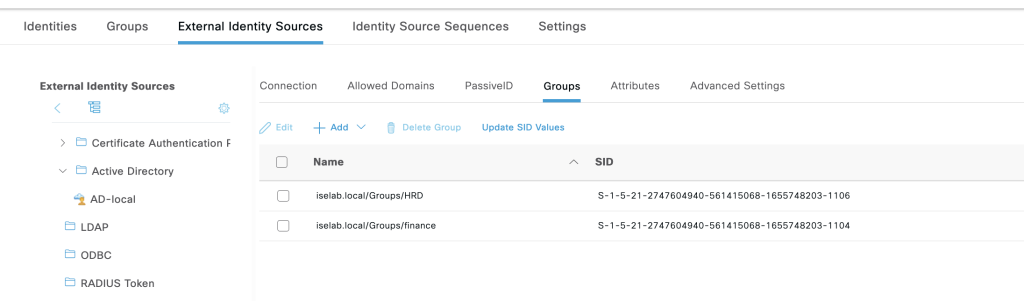
2. create SGACL to define rules between security group
a. Finance_to_server
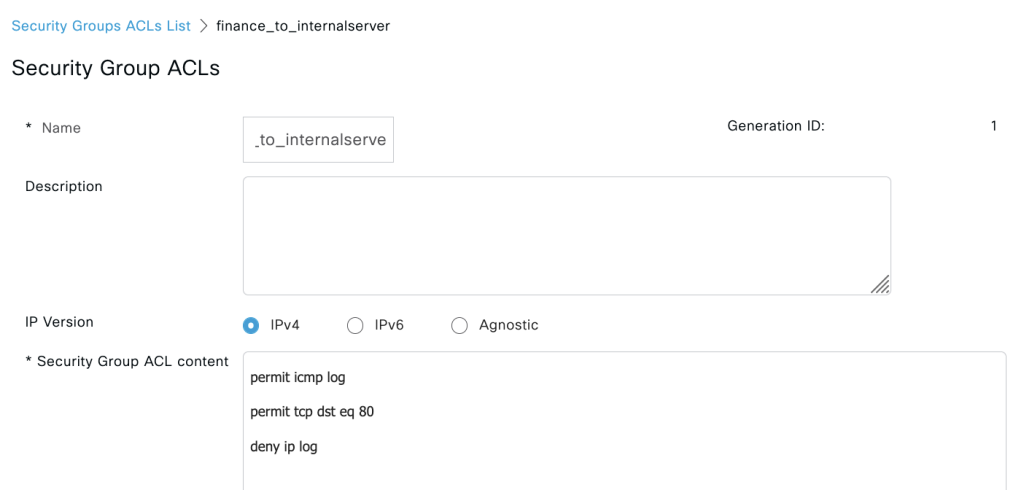
b. HRD_to_server
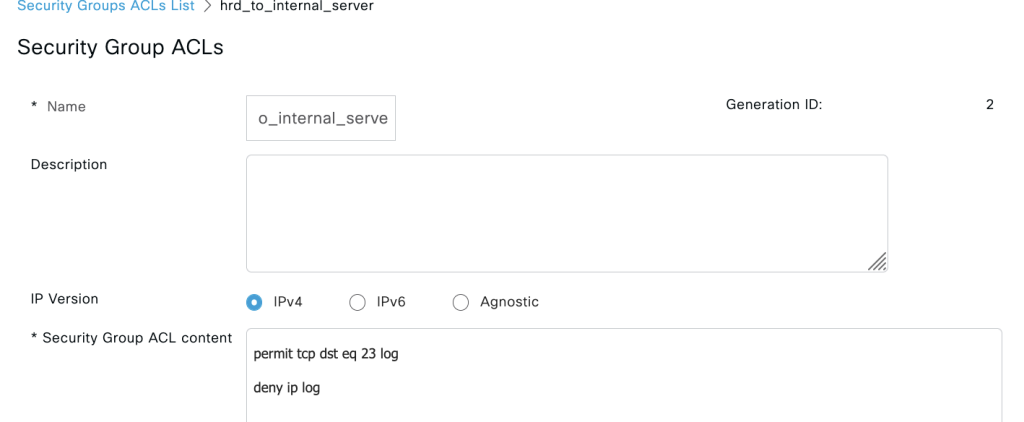
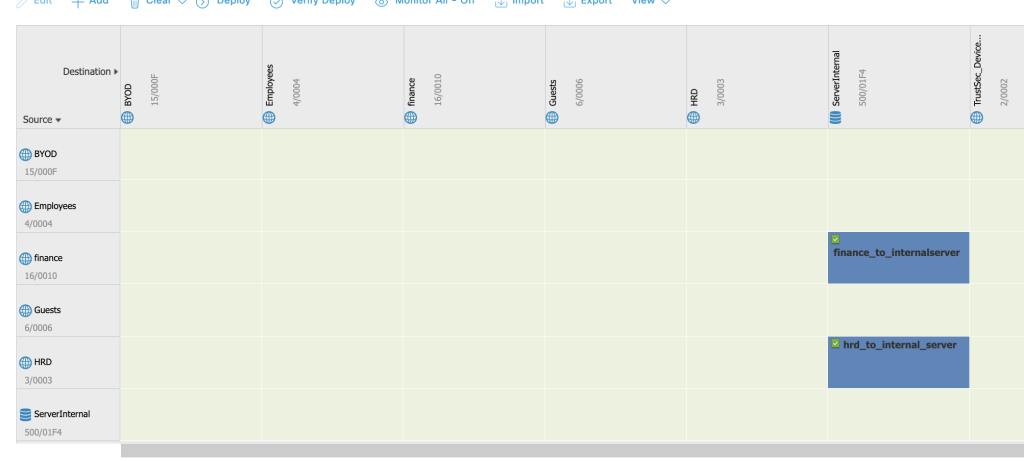
3. create matrix policy for trust sec
4. create policy authorization for both finance and HR
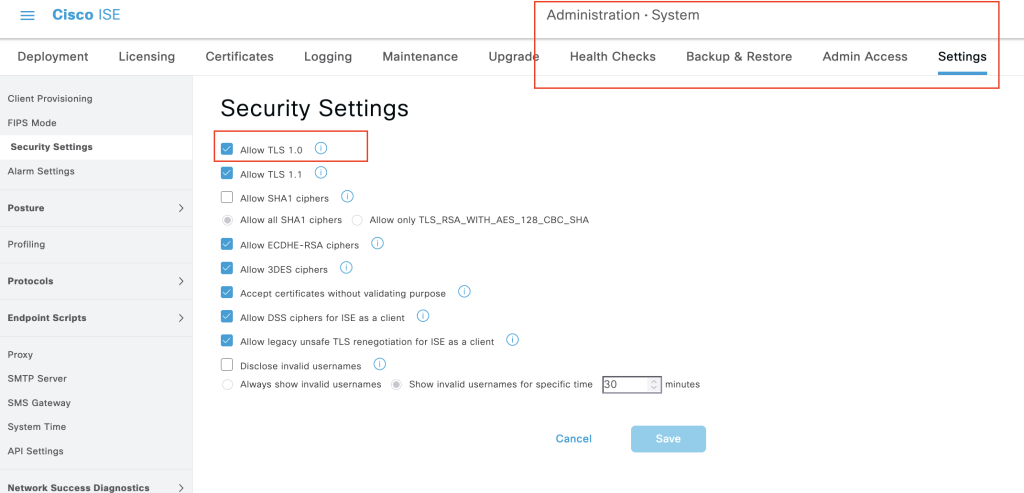
5. because we are using new version of cisco ISE and the devices is old device version we need to enable TLS 1.0
6. create security group for each group and make sure use manual configure id in the settings sgt.
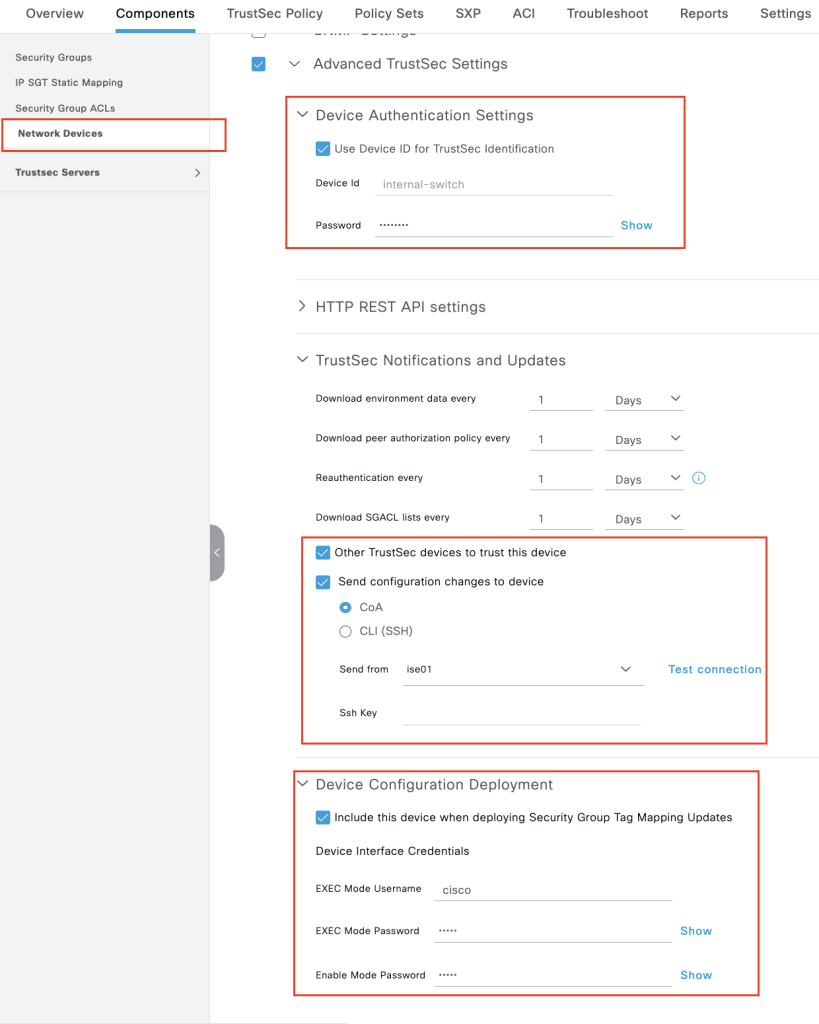
7. enable the switch to trustsec configuration feature, make sure the device id and the password is same for both cisco ise and catalyst 9k.
Switch 9K Configuration
- license for advance feature catalyst 9k
license boot level network-advantage addon dna-advantage
exit
wr mem
reload2. enable AAA for the catalyst
aaa new-model
aaa authentication dot1x default group radius
aaa authorization network default group radius
aaa authorization network TISE group radius
aaa accounting dot1x default start-stop group radius
aaa server radius dynamic-author
 client 167.205.196.79 server-key cisco123
aaa session-id common
radius server ISE
address ipv4 167.205.196.79 auth-port 1812 acct-port 18133. enable device ip tracking
conf t
device-tracking policy mytracking
tracking enable

# attach to interface toward switch 1 and server internal
int range Gi1/0/1-2
 device-tracking attach-policy mytracking

# we can verify the device ip tracking is enable with this command
show device-tracking Database4. configure CTS credential and download the PAC from cisco ISE, make sure the id and password same as value in cisco ISE
conf t
cts credentials id internal-switch password cisco123
cts authorization list TISE
radius server ISE
 address ipv4 167.205.196.79 auth-port 1812 acct-port 1813
pac key cisco1235. verify we can download the tacs with this command
show cts pacs 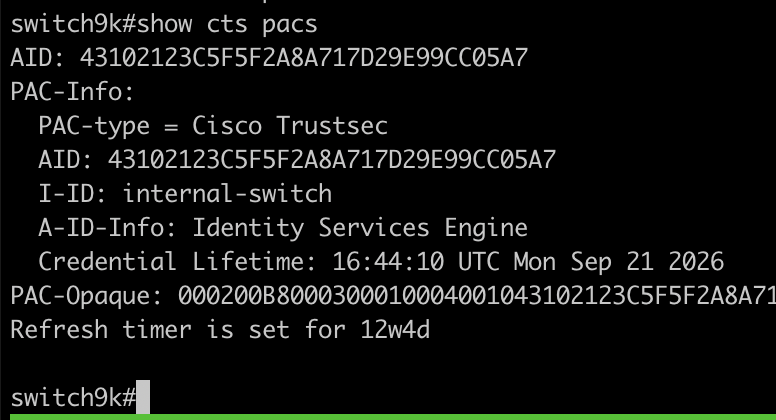
6. verify we also can download security group from cisco ise
show cts environment-data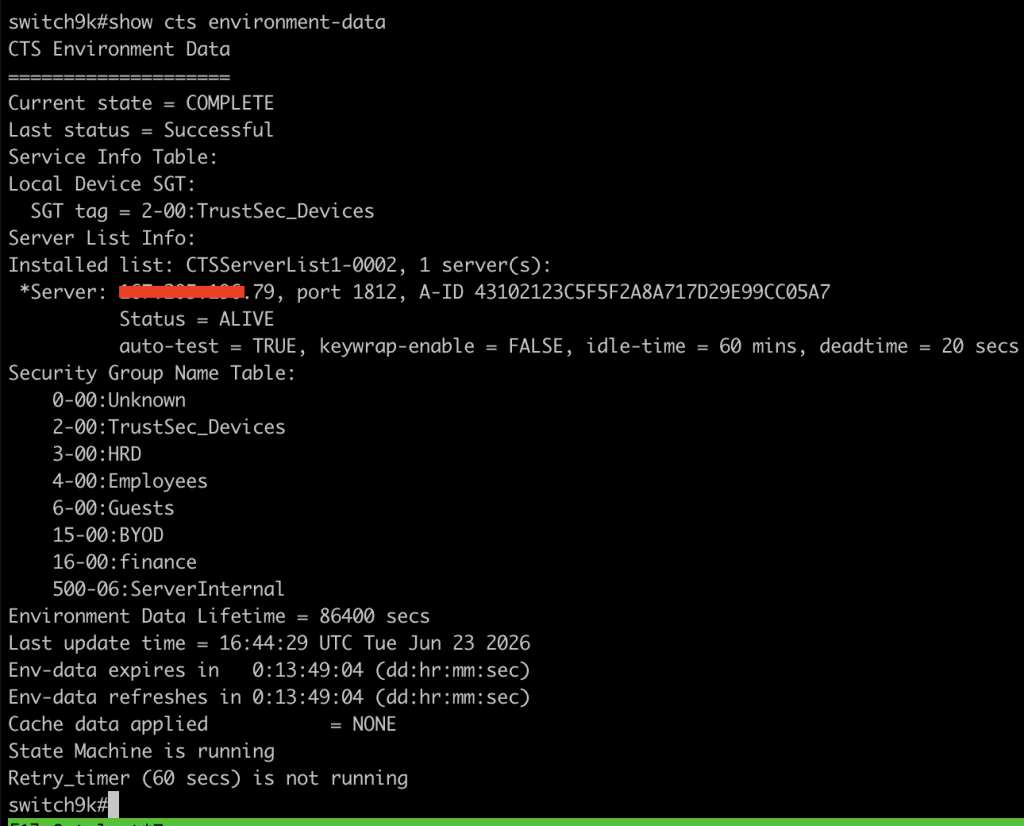
7. Because we need to know which sgt for the server-internal 192.168.100.222, we must configure static-sgt in the switch9k
cts role-based sgt-map 192.168.100.222 sgt 5008. When user authenticated via 802.1x in switch-1, the ip address need to be tagged security-group and forward the data to cisco catalyst 9k. for this purpose we must configure SXP between those 2 switch. Switch-1 is speaker and catalyst9k is listener.
# switch 1
cts sxp enable
cts sxp connection peer 192.168.100.111 password none mode local speaker

# switch catalayst 9k
cts sxp enable
cts sxp connection peer 192.168.100.5 password none mode local listener hold-time 0 09. verify the sxp connection is up using command
show cts sxp connections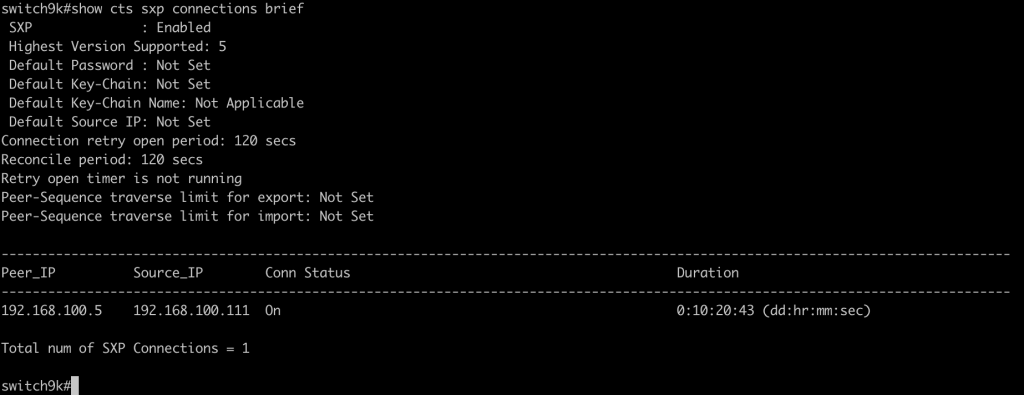
Switch-1 802.1x configuration toward clients PC
- enable AAA on the switch 1 and enable auth 802.1x interface for the client.
# global config enable AAA
aaa new-model
aaa authentication dot1x default group radius
aaa authorization network default group radius
aaa accounting dot1x default start-stop group radius
aaa server radius dynamic-author
 client 167.205.196.79 server-key cisco123
aaa session-id common
radius server ISE
 address ipv4 167.205.196.79 auth-port 1812 acct-port 1813
 key cisco123


# enable auth 802.1x interface
interface Ethernet0/2
 switchport mode access
 authentication event fail action next-method
 authentication order dot1x mab
 authentication priority dot1x mab
 authentication port-control auto
 mab
 dot1x pae authenticator
 dot1x timeout tx-period 10
 spanning-tree portfast edge
end2. you check the verification when user valid for auth with this command
show authentication sessions interface ethernet 0/2 details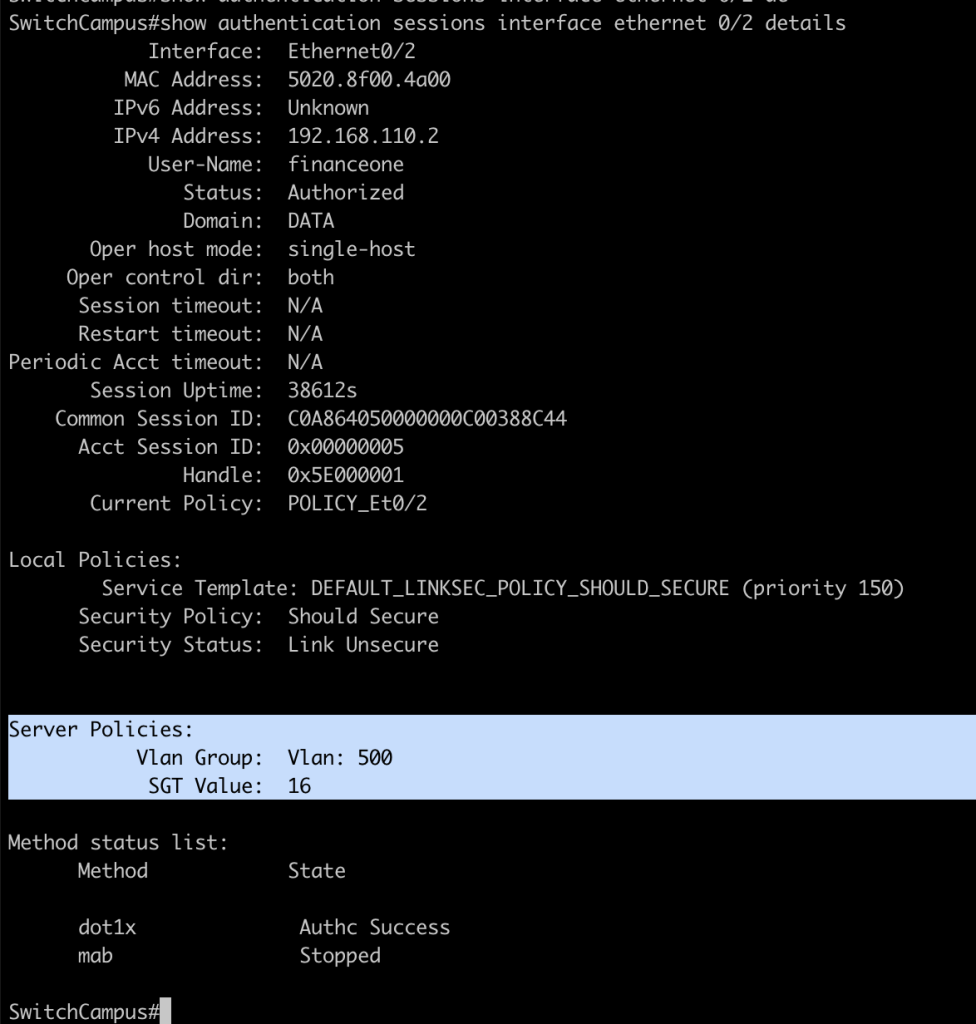
Configuring Enforcement Trustsec in catalyst 9k
- The trustsec now have information about security group for each source and destination server internal. we check with this command.
show role-based sgt-map all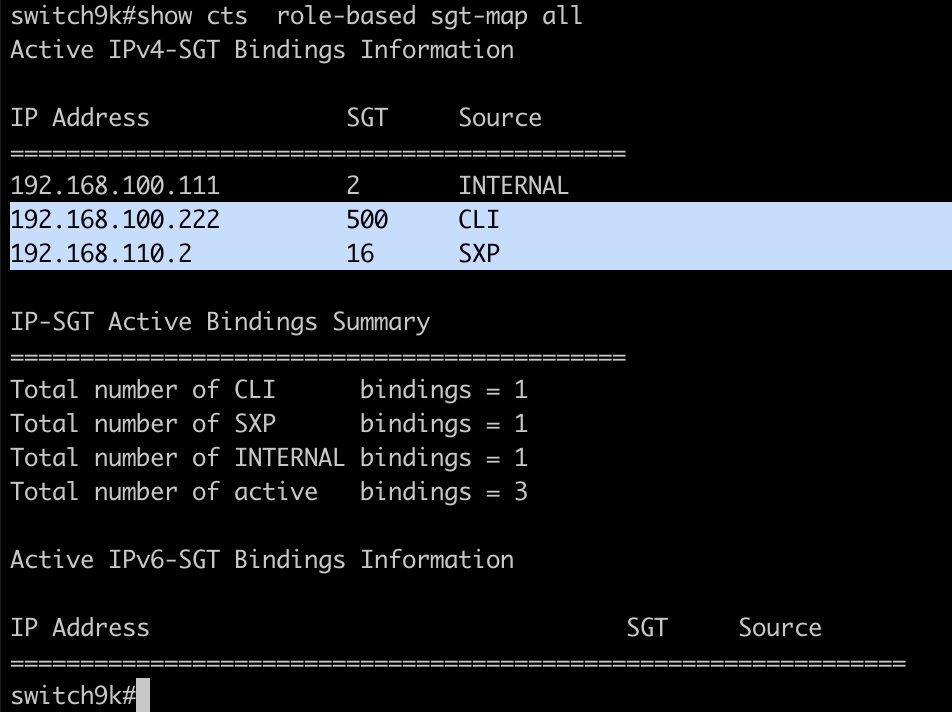
2. enable enforment trustsec on the switch
cts role-based enforcement
cts role-based enforcement vlan-list 13. verify we download the rbacl.
show cts rbacl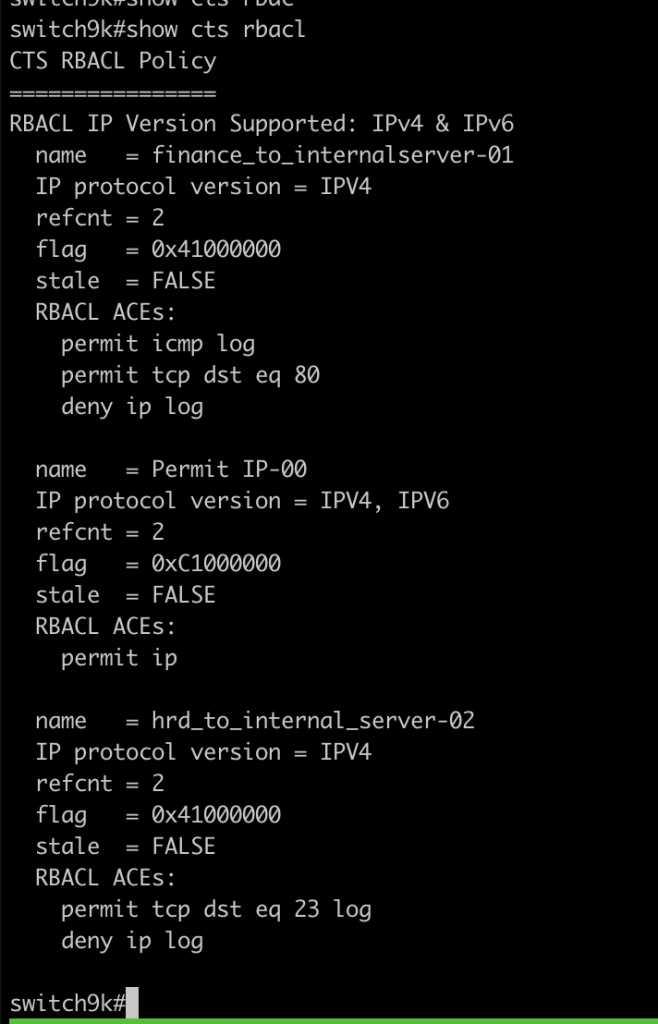
4. until this step the enforcement by the trustsec will kick in.
5. from the ISE web page we can see the hrdone is using authorize policy hrd trustsec authorize

Verifications Trustsec
- Login as group finance with user financeone via 802.1x.
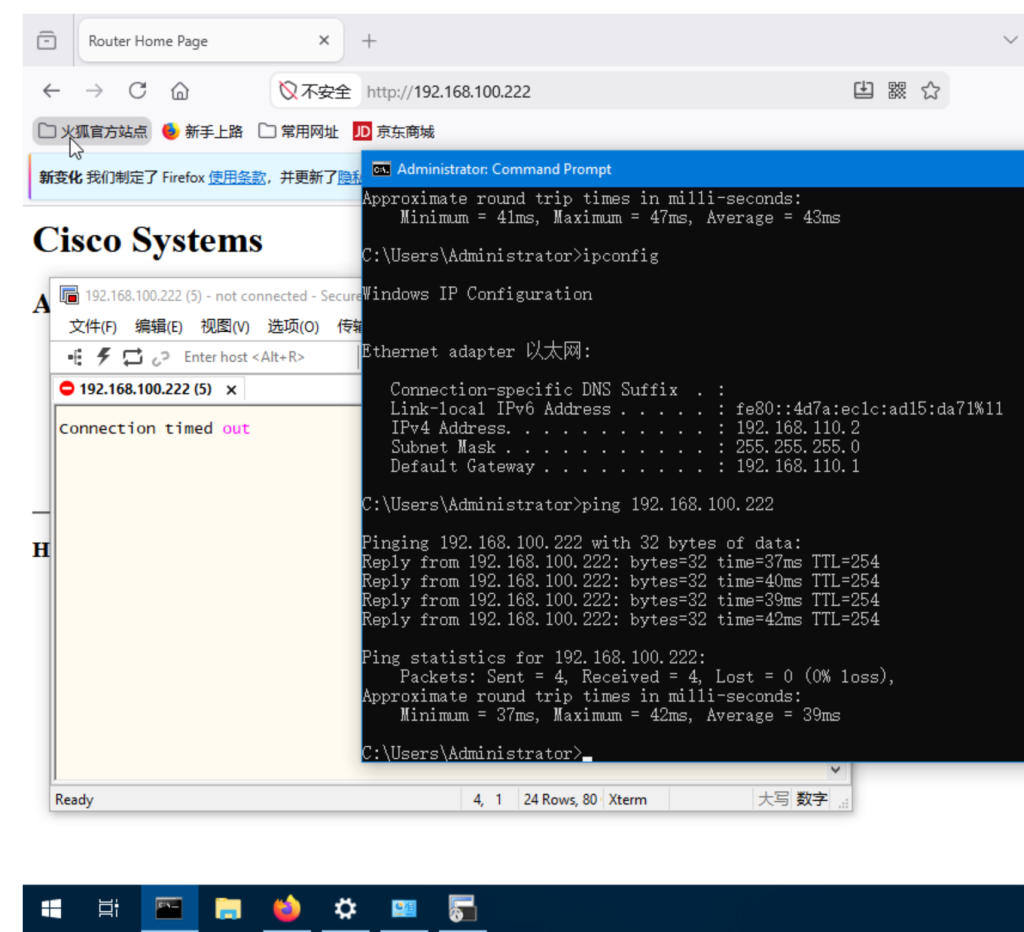
from this page user with group finance can ping, access the web but dont get access to telnet the serverinternal.
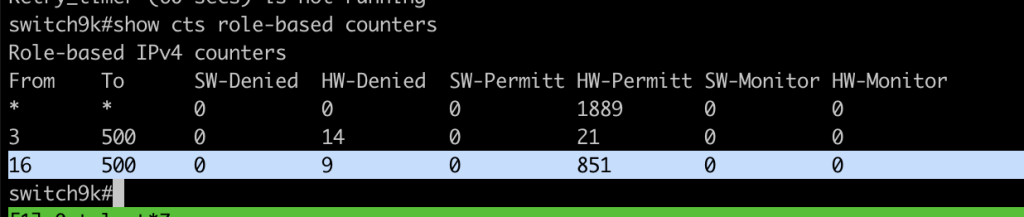
2. if we check the counter trustsec we could see the counter increase from sgt id 16 to 500
3. verify login with account HR Group hrdone
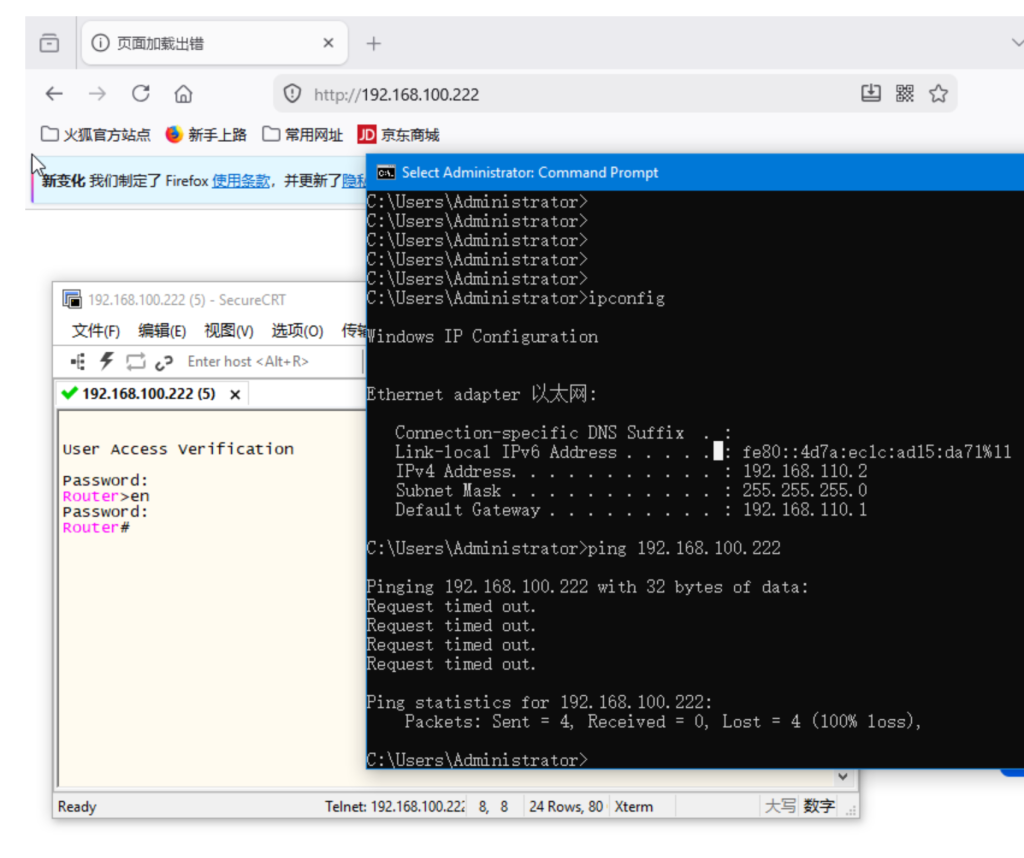
as you can see from the screenshoot,The enforcement trustsec take a place for connection HR, even we are using same ip address as finance 192.168.110.2.
the HR can only access telnet 192.168.100.22, but not for web access and ping connections
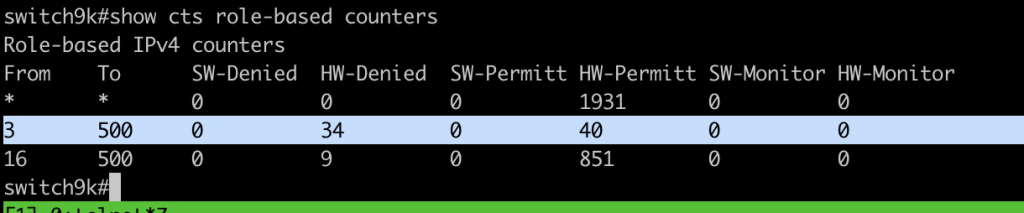
4. we can also check the counter for 3 to 500 security group is increase.
Conclusion and Lesson learned
- we need to have specific device to simulate trustsec, in this lab im using pnetlab 5.2 and catalys 9kv
- make sure the TLS 1.0 is enable in cisco ISE for communication with old device.
- The trustsec is good for microsegmentation implementation.
If you found this useful, subscribe to newsletter